

What ecommerce SEO is and where to start
Ecommerce SEO is the work of helping search engines find, understand, and rank an online store’s category and product pages, and of making those pages worth ranking. Start with structure and category pages, then product content, then the technical controls that stop filters and duplicate URLs from wasting Google’s attention.
This guide replaces a 2018 list of tips that had aged badly. The ten tips below are grounded in Google’s own ecommerce documentation and checked against it as of October 2026. They apply whether your store runs on Shopify, Magento (Adobe Commerce), or WooCommerce, with platform notes where the details differ.
At PROSeCommerce, part of PROS Global, a San Diego Shopify and Magento agency, these are the checks we start with on store audits, because they’re where most catalog sites lose search visibility. If you run Shopify and want a store-specific list, use our Shopify SEO checklist alongside this guide.
1. Build a structure Google can crawl
Google works out which pages matter on your store mostly from how they link to each other, not from the URL structure. Its guide to ecommerce site structure recommends linking from menus to category pages, from categories to subcategories, and from subcategories to every product you want indexed.
Two details from that guide are worth taking literally. Googlebot “generally doesn’t try to submit searches into a search box,” so a product reachable only through on-site search may never be found. And links should be real <a href> tags, not JavaScript click handlers on other elements.
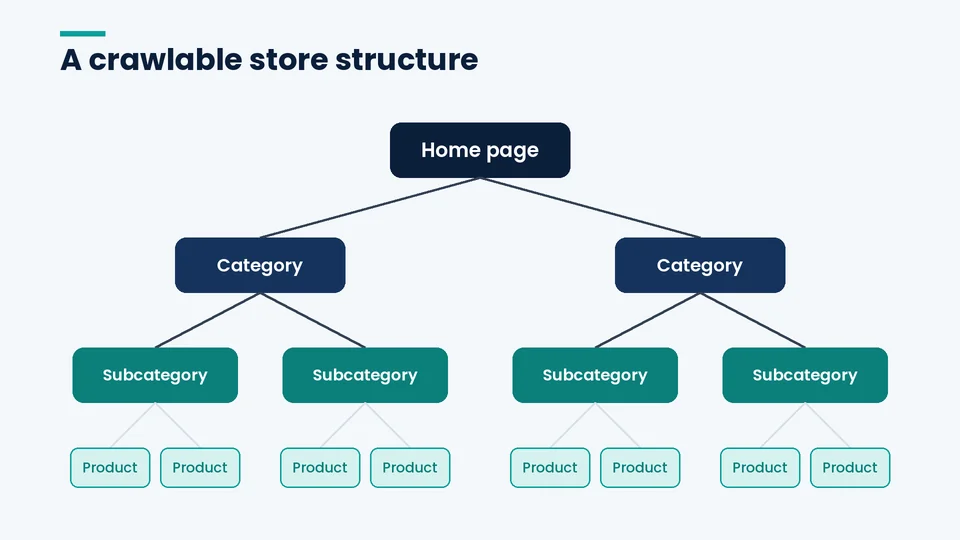
Use internal links to signal priority, too. Google notes that the more internal links a page has, the more important it tends to look relative to your other pages. If one product line drives your revenue, link to it from the home page and from relevant blog posts, not just from the menu.
2. Treat category pages as landing pages
Category pages usually target the broad, high-intent searches, such as “men’s trail running shoes,” while product pages pick up model and brand searches. That makes the category page one of the most valuable templates on the site, and often the most neglected.
A strong category page has:
- A clear, specific heading and title that match how shoppers phrase the search
- A short introduction that helps someone choose, such as how sizes run or which material suits which use, placed so it doesn’t push the products below the fold
- Links to subcategories and to closely related categories
- A product grid that loads as real links Google can follow
Keep empty categories out of the index. Google’s URL structure guide says that if a category has no items, use a noindex robots meta tag, and if the category is removed from your site’s browse paths, consider returning a 404.
3. Write product content that isn’t copied
Manufacturer descriptions appear on every retailer that carries the same product, so they give Google no reason to rank your page over anyone else’s. Rewrite them, and add the details only a seller knows: how the fit compares with other brands, what’s in the box, care instructions, compatibility, and the questions your customer service team answers most.
Original photos help in the same way. If you publish buying guides or comparisons, Google’s guidance on writing high-quality reviews asks for evidence of first-hand experience, quantitative measurements, and honest benefits and drawbacks. That standard is a good bar for product copy, too. Our guide to building a high-converting product page on Shopify covers the layout side.
4. Keep one clean URL per product
Every product should have one stable, descriptive URL that you use consistently in menus, internal links, sitemaps, and the canonical tag. Google’s URL guide recommends descriptive words in the path, such as /product/black-t-shirt-with-a-white-collar rather than /product/3243, and ?key=value parameters rather than bare values.
For variants, Google recommends a distinct URL per variant, either as a path segment (/t-shirt/green) or a query parameter (/t-shirt?color=green). If you use optional parameters, make the URL without the parameter the canonical.
Each platform handles this differently:
| Platform | Default behavior | What to check |
|---|---|---|
| Shopify | Products can load under collection paths as well as /products/ |
Canonical tags on collection-path product URLs point to the /products/ URL |
| Magento (Adobe Commerce) | Product URLs exclude the category path by default; the URL Rewrite tool creates a 301 when a URL key changes | Keep “Use Categories Path for Product URLs” off unless you have a reason, and check canonical settings |
| WooCommerce | Product base options include /product/, the shop base, or shop base with category |
Changing the permalink structure changes existing product URLs, so set up redirects first |
Adobe’s catalog URL documentation and WooCommerce’s permalinks guide cover the settings. WooCommerce’s guide is blunt: after a permalink change, old links “will return 404 errors unless you set up redirects.”
5. Control faceted navigation
Faceted navigation is the set of filters, such as size, color, brand, and price, that narrows a category page. It’s useful for shoppers, but filters built on URL parameters can create a near-infinite number of URLs. Google’s faceted navigation guide warns this leads to overcrawling and slower discovery of new pages.
Google’s preferred fixes, in order:
- If you don’t need filtered URLs in search, block them with robots.txt, or implement filters with URL fragments, which Google generally ignores.
- Canonical tags and nofollow on filter links are weaker options. Google calls them “generally less effective in the long term.”
- If some filtered pages should rank, use the standard
&separator, keep filters in a consistent order, and return a 404 for combinations with no results instead of an empty page or a redirect.
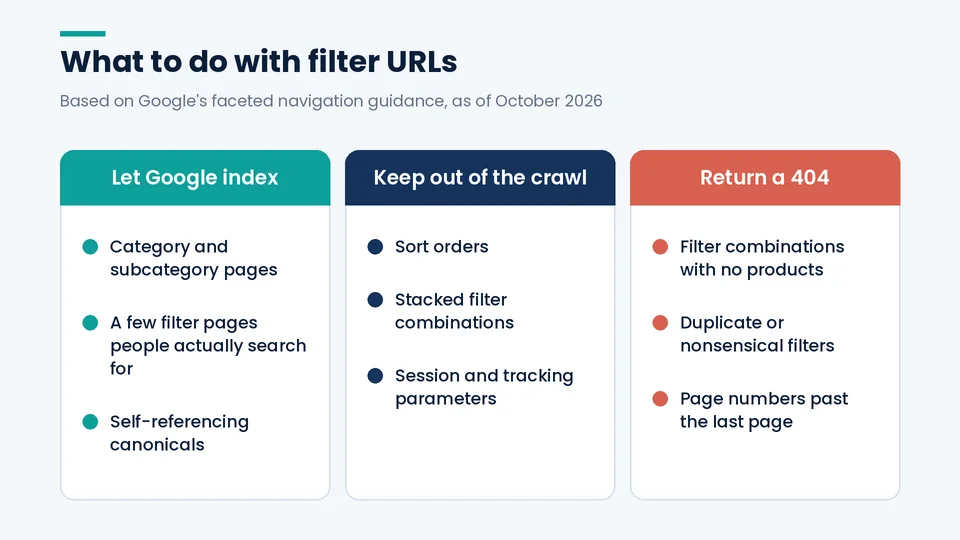
A sensible middle ground for most stores: let category and subcategory pages rank, pick a handful of filter pages people actually search for (such as a color or brand within a category) and give them clean, linked URLs, and keep the rest out of the crawl.
6. Paginate so every product can be found
Large categories need pagination, a “load more” button, or infinite scroll. Google’s pagination guide says its crawlers “don’t ‘click’ buttons,” so whichever pattern you use, the deeper pages need to be reachable through ordinary links.
The rules that matter:
- Give each page its own URL, such as
?page=2, and link pages in sequence with<a href>tags. - Don’t make page one the canonical for the whole series. Each page gets its own canonical.
- Don’t put page numbers after a
#, because Google ignores fragments. - Don’t rely on
rel="next"andrel="prev"; Google no longer uses them. - Use noindex or robots.txt to keep sorted versions, such as
?order=price, out of the index.
Google also says paginated pages can share the same title and description, so you don’t need to invent unique titles for page 7 of a category.
7. Add product structured data and a Merchant Center feed
Structured data tells Google the price, availability, and other details of a product in a consistent format. Google’s product structured data guide separates two types: merchant listings, for pages where customers can buy, and product snippets, for pages such as reviews where they can’t. Most store product pages should use merchant listing markup, with ProductGroup markup for variants.
Google also recommends return policy markup nested under your Organization markup, and a Merchant Center feed, which it says gives you “greater control over your data” and better odds that Google knows about every product. Google’s structured data policies are clear that it doesn’t guarantee markup will show up in results, but accurate markup helps Google understand price, availability, and variants. Make sure the markup matches what’s visible on the page, especially price and stock status.
8. Plan for out-of-stock and discontinued products
Out-of-stock pages are where many stores lose rankings they spent years building. Treat temporary and permanent cases differently:
- Temporarily out of stock: keep the page live, mark availability as out of stock in your structured data, show an expected restock date or a back-in-stock signup, and link to close alternatives.
- Permanently discontinued, with a clear replacement: 301 redirect the old URL to the replacement product or its category.
- Permanently discontinued, no replacement: return a 404 or 410, or keep a short page if it still earns links or traffic, with links to the nearest category.
Avoid redirecting every retired product to the home page. Shoppers who clicked for a specific item land somewhere irrelevant, and the redirect doesn’t carry that product’s relevance anywhere useful.
9. Write titles and snippets that match the page
Google’s title link guidance asks for “descriptive and concise” titles, warns against keyword stuffing, and calls out repeated boilerplate titles that make two pages impossible to tell apart. For products, a reliable pattern is product name, the key attribute shoppers compare (size, material, model), and your brand.
For categories, write the title around the search the page targets, not around your internal category name. Google’s snippet guidance says it may use the meta description when it describes the page better than other on-page text, so write it as a short, accurate pitch for the page. Google can still rewrite titles and snippets when something else on the page fits the query better.
10. Fix speed and image basics
Google’s Core Web Vitals guidance treats a Largest Contentful Paint within 2.5 seconds, an Interaction to Next Paint under 200 milliseconds, and a Cumulative Layout Shift under 0.1 as good. Catalog sites usually miss these on category and product templates, because of large images, third-party scripts, and apps. Our guide on how to speed up your Shopify store walks through the usual culprits.
For images, Google’s image SEO guide says alt text is “the most important attribute” for image metadata. Describe what the image shows in plain language, use descriptive filenames, and keep your main product image consistent across the page, the structured data, and your feed.
Ecommerce SEO and Google’s AI features
You don’t need a separate playbook for AI Overviews or AI Mode. Google’s AI features documentation says “there are no additional requirements to appear in AI Overviews or AI Mode, nor other special optimizations necessary.” Its AI optimization guide adds that there’s no need to break content into tiny chunks.
What helps is the same work as above: original product and category content, accurate structured data that matches the page, and clear answers to the questions shoppers ask before they buy.
How to measure progress
Search Console is the scoreboard. Each quarter, check:
- Page indexing: are category and product pages indexed, and are filter URLs staying out?
- Performance by page type: compare clicks and impressions for categories versus products.
- Shopping and merchant listing reports, if you use product structured data or Merchant Center.
- Crawl stats: a spike in crawled URLs often means filters or parameters are leaking.
If you’re changing platforms, protect what you’ve built with a redirect map and a Google site move plan. Our Magento to Shopify migration checklist and WooCommerce to Shopify migration checklist cover the SEO steps. When PROSeCommerce takes over an existing store, the first month of reporting usually tells us more about which of these ten tips to prioritize than any audit tool does.
Frequently asked questions about ecommerce SEO
How long does ecommerce SEO take to work?
Should I noindex filtered category pages?
Do product descriptions need to be unique for SEO?
Is structured data required to rank an online store?
What should I do with out-of-stock product pages?
Which ecommerce platform is best for SEO?
Putting these ecommerce SEO tips to work
Work through the list in order. Structure and category pages come first because every other fix depends on Google reaching the right pages. Product content and URL hygiene come next, then the technical controls, then measurement.
If you want help prioritizing these for your store, or a full audit across Shopify or Magento, PROSeCommerce’s ecommerce SEO and marketing services team can take a look. If your store also sells through Google Shopping or marketplaces such as Amazon, our sister team at PROS handles ecommerce advertising, shopping feeds, and marketplace management.