
What is SEO, and how does it help your website?
SEO (search engine optimization) is the work of making your website easier for search engines to find, understand and show to people who are looking for what you offer. According to Google Search Central, SEO is the process of increasing the visibility of website pages on search engines in order to attract more relevant traffic. Done well, it helps the right visitors land on useful pages. Done poorly, it wastes time on tricks that do not help people and can violate Google’s spam policies.
This guide explains what SEO is in plain language, how Google Search works at a high level, which practices matter first, what SEO does not do, and a practical checklist for ecommerce and service sites. At PROSeCommerce, part of PROS Global Inc in San Diego, we help merchants improve how their stores show up in search without inventing rankings promises. Guidance below was checked against Google’s public documentation as of November 2026.
How Google Search works (the short version)
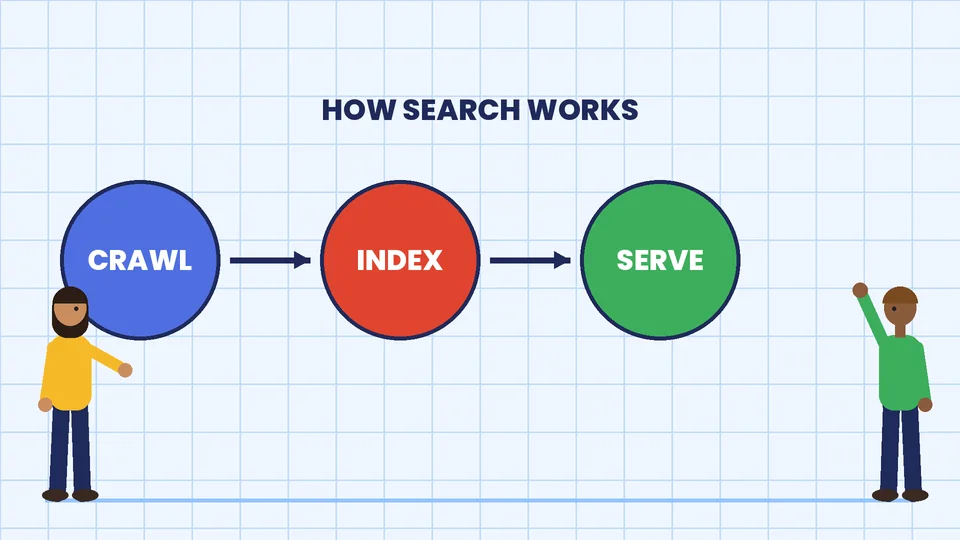
Google describes Search in three stages in its guide to how Google Search works:
- Crawling. Automated programs (crawlers) download text, images and videos from pages they find on the internet.
- Indexing. Google analyzes those files and stores information in a large database called the index.
- Serving results. When someone searches, Google returns information that is relevant to the query.
Not every page makes it through every stage. Google states that it does not guarantee it will crawl, index or serve a page even when the page follows the Google Search Essentials. That is an important expectation for business owners: SEO improves your odds of being found for relevant queries; it does not buy a guaranteed position.
What “good SEO” actually includes
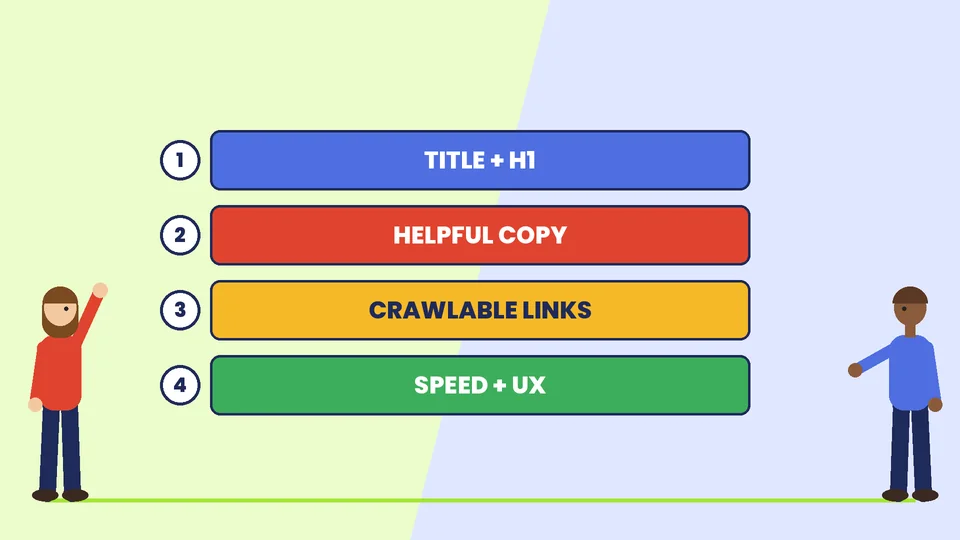
Google groups the essentials into technical requirements, spam policies and key best practices. For most store owners, the useful work falls into four buckets.
1. Helpful, people-first content
Google’s ranking systems are designed to prioritize helpful, reliable information created for people, not content created mainly to manipulate rankings. Its guide on creating helpful, people-first content asks whether your content would help someone who came to you directly, whether it shows first-hand experience, and whether readers leave feeling they learned enough to achieve their goal.
For ecommerce, that means clear product titles, honest descriptions, shipping and return details, and guides that answer real questions. Thin pages that repeat the same keyword and say little are a poor bet.
2. Clear language in important places
Google’s Search Essentials best practices say to use words people would use to look for your content, and to place those words in prominent locations such as the title and main heading, plus descriptive places such as alt text and link text. That is not a call to stuff keywords. It is a call to name things the way customers name them.
3. Crawlable links and a findable site structure
Search engines discover pages through links. Make important pages reachable from the homepage and category pages. Use normal HTML links. Fix broken links. Submit a sitemap when it helps, and do not block important pages in robots.txt by accident.
4. Technical basics that keep pages usable
Pages need to load for users and for crawlers. Use HTTPS, mobile-friendly layouts, and avoid blocking CSS or JavaScript that Google needs to understand the page. Google’s documentation covers Core Web Vitals and page experience as part of how sites appear; treat speed and usability as product quality, not as a magic ranking lever.
On-page SEO: a practical page checklist
Use this checklist when you publish or refresh a page:
| Element | What to do |
|---|---|
| Title (browser / SEO title) | One clear promise; include the main topic in natural language |
| H1 | Match the page topic; do not pack multiple competing H1s |
| Opening paragraph | Answer the main question in the first screen |
| Headings | Break the page into scannable H2/H3 sections |
| Body | Cover the topic with facts, steps or specs a buyer needs |
| Images | Descriptive alt text; compress files; avoid huge hero images |
| Internal links | Link to related category, product and guide pages |
| External facts | Cite official sources when you state rules or definitions |
| Indexing | Confirm the page is not noindexed unless you intend that |
Off-page and “authority” without the myths
Other sites linking to you can help people and search engines discover you. Google’s best practices include telling people about your site in communities where your products or services belong. That is earned visibility, not a paid ranking product.
What does not belong in a serious plan:
- Buying bulk links from unrelated sites
- Guarantees of “#1 rankings in 30 days”
- Hidden text, cloaking or doorway pages (these conflict with Google’s spam policies)
If an agency leads with guarantees instead of measurement and content quality, ask harder questions. PROSeCommerce treats SEO as ongoing site quality work tied to revenue pages, not as a ranking lottery.
SEO for ecommerce: where to focus first
Stores usually get more return from fixing money pages than from publishing dozens of thin blog posts.
- Category and collection pages. These often drive the most non-branded traffic. Write unique intros, fix thin duplicate templates, and make filters crawlable in a way your platform supports.
- Product pages. Accurate titles, specs, shipping promises and reviews matter more than poetic fluff.
- Site search and navigation. If shoppers cannot find products, crawlers struggle too.
- Policy and trust pages. Shipping, returns and contact details support both conversion and clarity.
- A small set of guides. Answer the questions that lead to purchase, and link those guides to the products they support.
For marketing that sits alongside SEO, see our guide to ecommerce marketing strategies and our overview of what a digital marketing strategy is.
SEO vs paid search
SEO and paid search (such as Google Ads) solve different jobs. Paid search can put a message in front of people quickly while you pay per click. SEO compounds when pages stay useful and crawlable, but it takes consistent work and does not replace ads when you need immediate coverage for a launch.
Many brands use both: ads for demand capture and tests, SEO for durable landing pages. Our primer on how Google Ads works explains the paid side without mixing the two budgets.
A 30-day SEO starter plan
If your site is live and you have limited time, do this in order:
- Confirm Search Console access. Use Google Search Console to see coverage and query data. Google documents Search Console as the tool for understanding how a site performs on Google Search.
- Fix blockers. Resolve noindex mistakes, robots blocks on important URLs, and widespread 404s on money pages.
- Rewrite the top 10 landing pages. Start with the pages that already get impressions or that map to your best products.
- Improve titles and H1s. Make each one unique and specific.
- Add internal links. From guides to products, and from products to related guides.
- Measure. Track organic sessions, conversions from organic landing pages, and indexed page counts. Adjust based on data, not anecdotes.
Pair this with conversion work. Traffic that does not convert still costs you attention. Our posts on conversion rates and conversion rate optimization cover that next step.
Common SEO mistakes
- Writing for crawlers instead of customers. Google explicitly warns against search-engine-first content.
- Duplicating manufacturer copy across hundreds of SKUs with no unique value.
- Ignoring mobile layout and slow templates.
- Chasing every algorithm rumor instead of fixing titles, content and crawl errors.
- Orphaning blog posts so they never link to products or categories.
- Promising rankings in sales decks. No ethical consultant can control Google’s results.
How to choose SEO help
Ask candidates:
- Which pages will you improve first, and why?
- How will you measure success (organic conversions, not vanity rankings alone)?
- What will you not do (link schemes, spun content)?
- Who writes the content, and who reviews facts?
- How do you handle site migrations and URL changes?
If you sell online, also ask how they work with your platform theme, apps and page speed. Platform choice still matters; see how to choose the best CMS for ecommerce.
Keep expectations honest with your team
Set a simple scoreboard: indexed money pages, organic sessions, organic conversions and the top queries in Search Console. Review monthly. Celebrate fixes that remove blockers, not vanity ranking screenshots. When leadership asks for guaranteed positions, point back to Google’s own statement that crawl, index and serving are not guaranteed even for pages that follow the essentials.
Frequently asked questions
What does SEO stand for?
Is SEO free?
How long does SEO take?
Do I need an SEO agency?
What is the difference between SEO and SEM?
Can SEO guarantee first-page rankings?
Make SEO a business habit
SEO helps your website when it makes pages clearer for people and easier for search engines to process. Start with accurate titles, helpful product and category content, crawlable links and honest measurement. If you want a second pair of eyes on your store’s search foundations, contact PROSeCommerce and we will help you prioritize the pages that can move revenue.
Sources
- Google Search Central, Documentation hub: https://developers.google.com/search/docs
- Google Search Central, How Google Search works: https://developers.google.com/search/docs/fundamentals/how-search-works
- Google Search Central, Google Search Essentials: https://developers.google.com/search/docs/essentials
- Google Search Central, Creating helpful, people-first content: https://developers.google.com/search/docs/fundamentals/creating-helpful-content
- Google Search Central, SEO Starter Guide: https://developers.google.com/search/docs/fundamentals/seo-starter-guide