
What makes a good ecommerce email template?
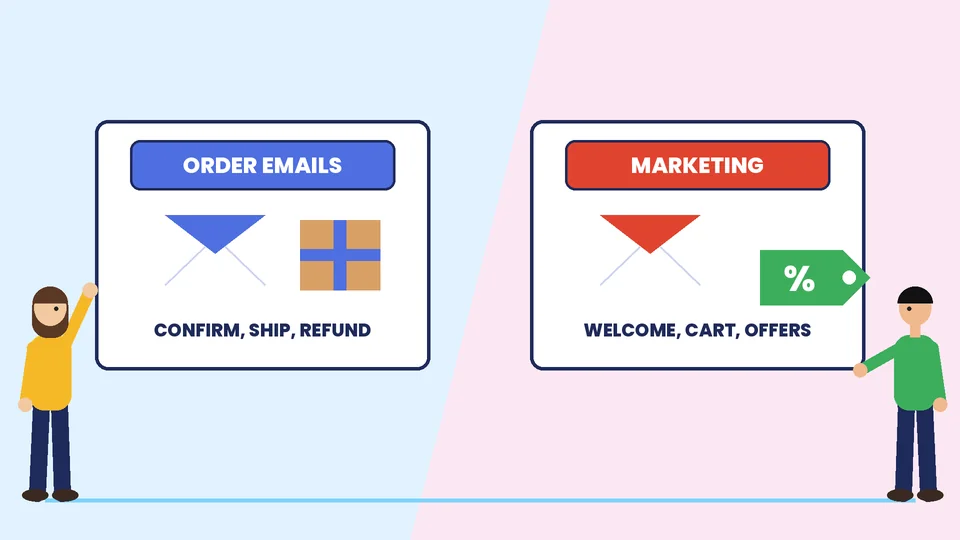
A good ecommerce email template is a reusable layout with a clear purpose, one main call to action, readable text, honest subject lines and the legal and technical basics built in. You need two families of templates. Transactional templates confirm what a customer did, such as placing an order or resetting a password. Marketing templates promote products or bring customers back, such as welcome messages, abandoned cart reminders and offers. Each family has different rules for content, design and consent.
This guide shows which templates an online store needs, what goes inside each one, how to edit order notifications on Shopify, how to meet the main US and Gmail sending rules, and how to test before you send. At PROSeCommerce, part of PROS Global Inc in San Diego, we build and tune online stores and their email programs. Rules and platform pages were checked in November 2026. This article is general information and not legal advice, so check your own situation with a qualified attorney.
Transactional vs marketing emails
The difference matters because the rules differ.
| Transactional emails | Marketing emails | |
|---|---|---|
| Purpose | Confirm or update something the customer asked for | Promote products, content or offers |
| Examples | Order confirmation, shipping confirmation, refund, password reset | Welcome series, abandoned cart, back in stock, win-back, newsletters |
| Customer expectation | Expected and wanted | Sent with permission and easy to stop |
| Unsubscribe | Usually not offered for essential messages | Required, easy and visible |
| Main goal | Clarity and trust | Clicks and sales |
Shopify describes customer notifications as automated emails and SMS messages about orders, shipping updates and account activity, and says most of them are sent automatically and cannot be deactivated. Marketing email goes through a separate tool, either Shopify’s own email feature or a dedicated platform.
The templates every online store needs
Start with the essentials before you add extras.
Transactional
- Order confirmation. Sent when a customer places an order. It should show the order number, items, prices, shipping address, delivery method and a way to contact you.
- Shipping confirmation. Sent when the order is fulfilled. Include the carrier, tracking link and expected delivery window.
- Shipping update and delivered notices. Short messages that reduce “where is my order?” questions.
- Refund or cancellation. State the amount, the payment method used and when the money should arrive.
- Account and password messages. Keep them plain and never ask for a password by email.
Marketing
- Welcome email. Introduce the brand, set expectations for how often you will write and offer a first helpful step.
- Abandoned cart reminder. Show the items left behind and make the return path one click.
- Post-purchase follow-up. Ask how the product is working, share care or setup tips and invite a review.
- Win-back message. Reach out to customers who have not bought in a long time, with a clear reason to return.
- Promotional and newsletter templates. Use them for launches, seasonal offers and content.
For ideas on grouping customers so each message fits its audience, see our guide to Shopify email segmentation. For tools that help personalize at scale, read about the best AI email marketing tools.
What goes inside a template
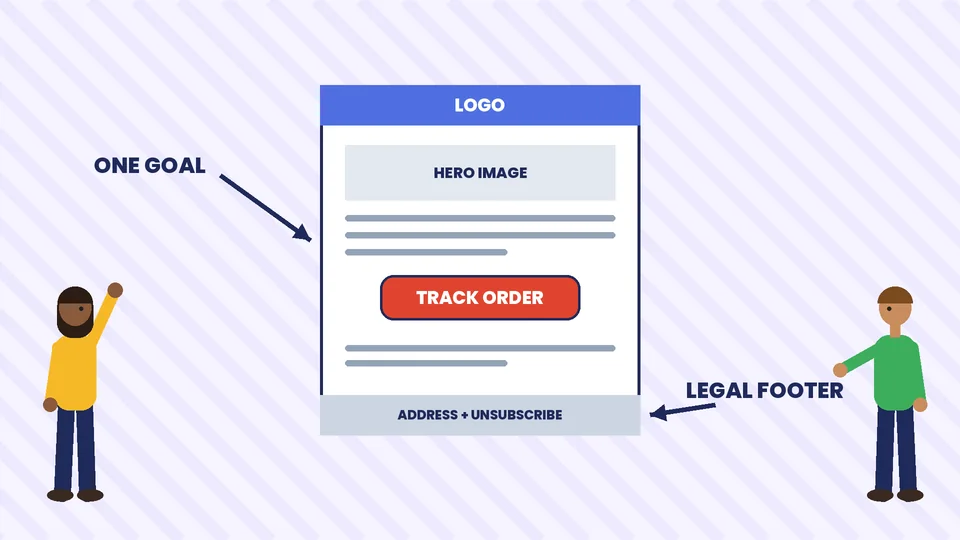
Every template follows the same skeleton. Fill each part on purpose:
- From name and address. Use a name customers recognize, such as your store name, and a real reply address.
- Subject line. Say what is inside. Never mislead.
- Preview text. The line after the subject in most inboxes. Use it to add detail, not to repeat the subject.
- Header. A small logo and, if useful, a link back to the store.
- Main message. One idea, written in short paragraphs.
- Primary button. One clear action, with text that says what happens next, such as “Track your order”.
- Supporting content. Product details, order summary or tips, kept scannable.
- Footer. Your business name and postal address, a way to reach support and, for marketing email, an unsubscribe link.
Keep marketing templates focused on one goal. If you try to sell five things in one email, the customer usually acts on none.
Design rules that work across email apps
Email apps render messages differently, so simple designs hold up best. These are common practices, not formal standards, so test them in your own audience:
- Use a single column. It reads well on a phone and still works on a desktop.
- Keep the width moderate. Many designers use around 600 pixels for the main content area.
- Use live text, not text inside images. Some apps block images by default, and screen readers cannot read text in pictures.
- Write meaningful alt text for every image, including product pictures.
- Make buttons large. Thumbs need room, and a bulletproof button built from HTML and styles works better than an image.
- Use web-safe fallback fonts and strong color contrast between text and background.
- Send a plain text version alongside the HTML version, so the message still works where HTML does not.
- Mind file size. Compress images so the email loads quickly on mobile data.
Edit your order emails in Shopify
Shopify’s Help Center says you manage the email and SMS notifications your store sends to customers and staff from the Notifications page in your Shopify admin. Notifications are triggered by events such as order placement, fulfillment, refunds, exchanges and account changes. A sensible routine is:
- Open the notification list in your admin and review each message a customer can receive.
- Edit the wording, logo and colors so the message sounds like your brand, and keep the order details Shopify inserts for you.
- Preview each template and send a test to yourself before you save changes.
- Place test orders and check the full sequence, from confirmation to delivery.
- Review the templates every quarter, or when you change your shipping partner or return policy.
Shopify also says the Shop app’s tracking and order status notifications cannot be deactivated or edited by merchants. If you change code in a template, keep a copy of the original so you can restore it. For help with theme and notification customization, our Shopify development services page explains what a scoped project includes.
Rules to follow when you send marketing email
The US CAN-SPAM Act
In the United States, the FTC’s CAN-SPAM compliance guide for businesses summarizes the main rules for commercial email. It says you must:
- Not use false or misleading header information. The “From”, “To” and routing details must be accurate and identify who sent the message.
- Not use deceptive subject lines. The subject must reflect the content of the message.
- Identify the message as an ad. The law gives you flexibility in how you do it.
- Tell recipients where you are located. Include a valid physical postal address.
- Tell recipients how to opt out. Give a clear and easy way to stop future email.
- Honor opt-out requests promptly. The FTC guide says within 10 business days, and you cannot charge a fee or require more than a simple reply or web page visit.
- Monitor what others do on your behalf. If an agency or affiliate sends email for you, you are still responsible.
The FTC guide also explains that transactional or relationship messages, such as order confirmations, are exempt from most of these provisions but still may not contain false or misleading routing information. The rule is in 15 U.S.C. §7702 and the FTC’s regulation at 16 CFR 316.3 covers the definition of such messages. Confirm the current text on ftc.gov before you rely on it. Outside the US, other rules apply, including consent requirements in some countries, so check the laws where your customers live.
Gmail and bulk sender requirements
Google’s email sender guidelines set extra requirements for senders who send 5,000 or more messages a day to personal Gmail accounts. They include:
- SPF and DKIM authentication, plus a DMARC record for your sending domain, which can use a policy of none.
- A TLS connection and messages that follow the RFC 5322 format.
- A From domain that aligns with your SPF or DKIM domain.
- One-click unsubscribe for marketing and promotional messages, plus a visible unsubscribe link.
- Spam rates, as reported in Postmaster Tools, kept below 0.30%. Google advises keeping it below 0.10%.
Google’s FAQ adds that one-click unsubscribe is required for marketing and promotional messages and not for transactional ones such as password resets. Even if you send fewer messages, setting up SPF, DKIM and DMARC is good practice because it helps protect your brand from spoofing and keeps order emails out of spam. Our ecommerce security checklist covers other safeguards for your store.
Security rules for email templates
Customers learn to trust the emails you send, and criminals copy them. Protect that trust:
- Never ask customers to send passwords or full card numbers by email.
- Link to your own domain only, and avoid link shorteners in transactional messages.
- Show the order number and the last digits of the order, not sensitive data.
- Authenticate your domain with SPF, DKIM and DMARC.
- Tell customers how you will contact them, so they can spot fake messages.
- Review who can edit templates and who can send campaigns from your accounts.
If your messages mention payments, make sure the details match your checkout. Our guide to secure payment gateway features helps you review that side.
How to test before you send
- Send test emails to several addresses on different providers, including Gmail and Outlook.
- Check on a phone and on a desktop, in light and dark modes if your tool supports them.
- Turn images off to see whether the message still makes sense.
- Click every link and confirm each one goes to the right page.
- Check personalization fields so no one receives a greeting with a blank name or a raw merge tag.
- Review the footer for your address, support contact and unsubscribe link.
- Test the plain text version.
After launch, measure results. Watch delivery, open and click rates, unsubscribes, spam complaints and, most important, orders. Use A/B testing to improve one element at a time.
Common email template mistakes
- Cramming in too many offers. One goal per email works better.
- Hiding the unsubscribe link. It frustrates readers and breaks the rules.
- Using vague subject lines or clickbait. They hurt trust and may be deceptive.
- Skipping mobile tests. Many people read email on a phone first.
- Forgetting transactional emails. Order and shipping messages are the ones customers open most, so give them care.
- Sending without authentication. Unauthenticated messages are more likely to land in spam.
Frequently asked questions
What is an ecommerce email template?
Which email templates does an online store need first?
Do transactional emails need an unsubscribe link?
What does CAN-SPAM require in a marketing email?
Can I edit Shopify order confirmation emails?
How do I keep my emails out of the spam folder?
Build templates that customers trust
Strong ecommerce email starts with clear templates, honest messages and a setup that protects your customers. If you would like help planning your templates, notifications and email platform, contact PROSeCommerce and we will help you build a sequence that fits your store.