

What this Magento to Shopify checklist covers
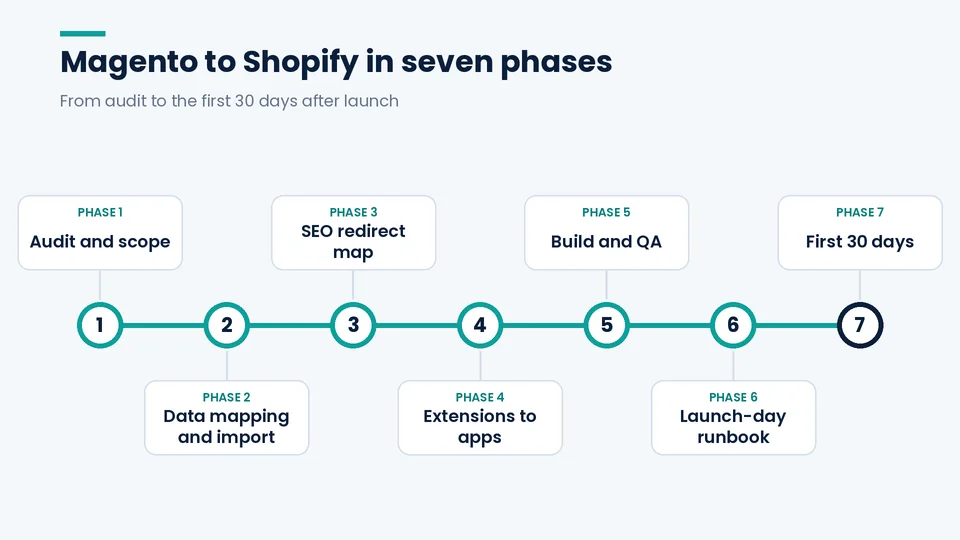
A Magento to Shopify migration runs in seven phases: audit the current store, map Magento’s data model to Shopify’s, build a URL-by-URL 301 redirect map, replace extensions with apps (or retire them), test on a development store, launch with a scripted cutover, and watch the store closely for 30 days. When migrations go wrong, it’s usually one of three gaps: configurable products and attributes that didn’t map cleanly, redirects that were missing or pointed to the wrong place, and integrations or tracking that nobody retested before the domain moved.
This checklist reflects how we run these projects at PROSeCommerce, a San Diego Shopify and Magento agency that’s part of PROS Global. It assumes you know Magento well and focuses on where Shopify behaves differently. If you’re coming from WooCommerce instead, use our WooCommerce to Shopify migration checklist.
Key terms
- Magento / Adobe Commerce: Magento Open Source is the free, self-hosted edition. Adobe Commerce is the licensed edition, which can run on Adobe’s cloud infrastructure.
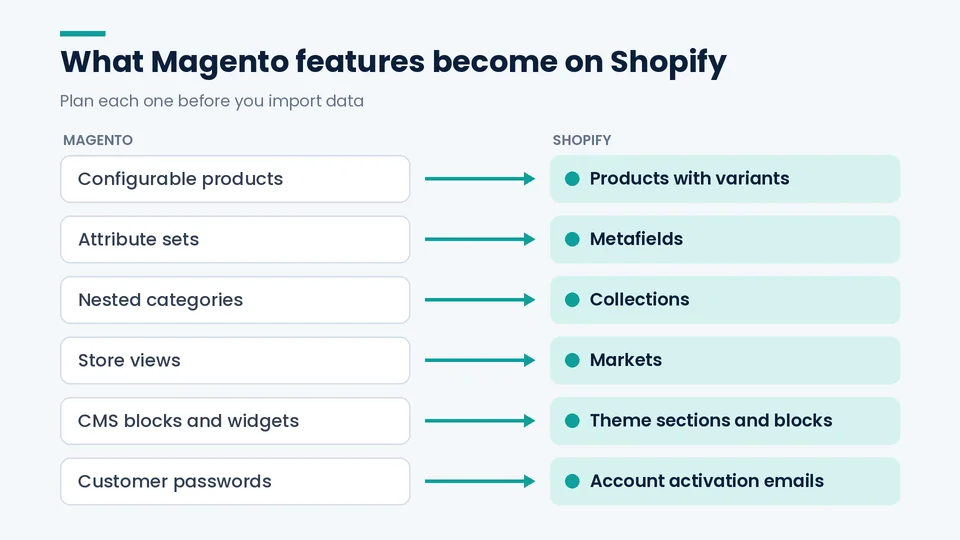
- Configurable product (Magento): A parent product with child simple products for each option combination. On Shopify this becomes a product with variants.
- Attribute set (Magento): A group of custom product fields. On Shopify these usually become metafields.
- Store view (Magento): A language or locale version of a store. On Shopify this is handled through Markets.
- Shopify Plus: Shopify’s enterprise plan, which adds B2B features, checkout extensibility, and higher limits.
Why Magento teams are moving in 2026
For a lot of teams the deadline comes from the support calendar. According to Adobe’s Commerce lifecycle policy:
- Adobe Commerce 2.4.6 reached the end of regular support on August 11, 2026. Extended support runs to August 31, 2027.
- Extended support for 2.4.4 ended April 14, 2026, and for 2.4.5 on August 11, 2026.
- Adobe offers a one-time, security-only transitional period for 2.4.4 through 2.4.6. It includes isolated security fixes and no quality fixes, and Adobe says it won’t be extended.
On the hosting side, PHP 8.2 stops receiving security fixes on December 31, 2026 (PHP.net). That matters if your Magento install still runs on it.
None of this forces you onto Shopify. Upgrading Magento is a legitimate option. What the dates do is force a decision, and many teams would rather spend the budget on a migration than on another upgrade cycle. If you’re weighing the two platforms, our comparison of Shopify Plus and Magento lays out the trade-offs.
Phase 1: Audit and scope
When the PROSeCommerce team scopes a Magento to Shopify move, this audit comes before any estimate or theme discussion. It’s the step that shows which extensions, integrations, and URL patterns will actually drive the timeline.
Inventory
- List every extension, custom module, and integration (ERP, PIM, 3PL, tax, payments, email/SMS, reviews, loyalty, feeds) and what each does for revenue or operations.
- Document store views, currencies, and domains. Include customer groups, tier pricing, and cart price rules.
- Record which product types you use (simple, configurable, bundle, grouped, virtual, downloadable) and which attributes show on the storefront or drive layered navigation.
SEO baseline
- Crawl every store view and save each URL with its status code, title, meta description, canonical, and H1.
- Export Search Console performance by page, your XML sitemaps, the Magento URL rewrite table, existing redirects, and backlink data.
- Save organic sessions, revenue, and conversion rate by landing page.
Shopify or Shopify Plus? The audit usually settles it. B2B or customer-group pricing, checkout customization, and custom backend logic point toward Plus. Only Plus stores can use custom apps that contain Shopify Function APIs, although public App Store apps that use Functions work on any plan (Shopify.dev). For a fuller picture, see what you should know about Shopify Plus.
What breaks: Magento features vs. Shopify equivalents
Most Magento features have a Shopify equivalent, but very few map one to one. As of October 2026, configurable products become products with variants, capped at three options and 2,048 variants per product; attribute sets become metafields; store views become Markets; and custom checkout logic moves to checkout extensibility and Shopify Functions, where custom Functions apps require Shopify Plus.
| Magento | Shopify | What to plan for |
|---|---|---|
| Configurable products | Products with variants | Max 3 options per product (Shopify.dev) and up to 2,048 variants (Shopify changelog). A fourth option means splitting the product or adding an options app. |
| Attribute sets | Metafields | Define metafields before the import so storefront attributes have somewhere to land. |
| Nested categories | Collections | Deep category trees usually get flattened. Automated collections can use tags, type, vendor, or metafields. |
| Layered navigation | Collection filters | Filter URLs change. Only filter pages that earned real traffic deserve their own collection. |
| Customer groups / tier pricing | Shopify B2B (company accounts, catalogs, price lists) or apps | Shopify’s pricing page lists B2B with limited catalogs on non-Plus plans (Shopify pricing). Confirm your catalog count and pricing logic fit before you commit to a plan. |
| Store views | Markets | Each market can get its own domain or subfolder (Shopify Markets). Update hreflang. |
| CMS blocks and widgets | Theme sections and blocks | There’s no import path. Rebuild the content that actually converts. |
| Custom checkout | Checkout extensibility and Functions (Plus) | Shopify Scripts were deprecated on June 30, 2026 (Shopify.dev changelog). Plan any custom logic around Functions. |
| Cart price rules | Shopify discounts, apps, or Functions | Test stacking behavior one rule at a time. |
| Customer passwords | Account activation | Passwords can’t be migrated (Shopify). Write the activation email in advance. |
.html URLs and category paths |
Fixed prefixes: /products/, /collections/, /pages/, /blogs/ | Nearly every URL changes. |
Phase 2: Data mapping and import
Data mapping means deciding, before anything is imported, where each Magento field will live in Shopify: a core product field, a metafield, a tag, or nowhere. Get it signed off first, because customer passwords can’t be migrated and deep category trees usually flatten into collections, and both decisions ripple into the import, the theme, and the redirect map.
Build a field-level mapping sheet with four columns: Magento field, Shopify destination (core field, metafield, tag, or “not migrated”), transformation rule, and owner.
- Product core fields: title, description, SKU, barcode, price, compare-at price, weight, inventory by location.
- Configurable options mapped to Shopify options, with variant SKUs and image-to-variant assignments confirmed.
- SEO fields: meta title, meta description, and Magento URL key mapped to the Shopify handle. Matching handles to URL keys keeps the redirect rules simple.
- Image alt text carried over.
- Decide how much order history to keep (for support, warranties, and lifetime-value segmentation).
- Separate export/import plans for reviews, loyalty points, subscriptions, and gift cards.
- A complete dry run into a development store.
B2B accounts need their own plan. If you sell wholesale, map each Magento customer group to Shopify’s B2B model of companies, locations, catalogs, and price lists, then rebuild and verify each group’s pricing individually. Two practical rules hold up well. First, scope the ERP integration alongside the storefront, not after it. Second, consider moving a small set of wholesale accounts first before switching everyone.
Multiple Magento websites or store views. Decide early between one Shopify store using Markets (languages, currencies, and domains or subfolders per market) and separate Shopify stores for genuinely different brands or catalogs. As of October 2026, Shopify Plus includes your main store plus nine expansion stores in the plan fee, charges $300 a month for each additional store, and requires a separate Plus contract for each brand (Shopify Plus pricing). That choice shapes your redirect map, hreflang, and reporting.
Import order: products, then customers, then orders, since orders reference both (Shopify). CSV works for small, simple catalogs. Migration apps handle standard structures. Custom API scripts make sense for configurable-heavy catalogs, B2B pricing, or ERP sync.
Don’t take “import succeeded” at face value. Check your top revenue SKUs first, then complex products, then a sample from each collection. Metafields can fail without showing an error.
Phase 3: The SEO redirect map
A Magento to Shopify redirect map pairs every old URL that has traffic, backlinks, or revenue with one new Shopify URL, loaded as permanent 301 redirects before the domain moves. It matters more than usual on this migration because Magento’s .html product URLs and nested category paths can’t be kept; Shopify uses fixed prefixes such as /products/ and /collections/.
Google says permanent (301) redirects don’t cause a loss in PageRank. It also lists redirecting to wrong or nonexistent URLs as one of the most common migration mistakes (Google Search Central).
1. Collect every old URL from the rewrite table, your crawl, Search Console, old sitemaps, backlink exports, and analytics landing pages. Magento can serve the same product at several URLs when “Use Categories Path for Product URLs” is enabled (Adobe), so map every path variant, not just the canonical one.
2. Write pattern rules, then handle exceptions:
| Magento URL (example) | Shopify URL | Rule |
|---|---|---|
| /helena-hooded-fleece.html | /products/helena-hooded-fleece | Strip .html, add /products/ |
| /women/tops-women/helena-hooded-fleece.html | /products/helena-hooded-fleece | All category-path variants go to one product |
| /women/tops-women.html | /collections/tops-women | Category to collection |
| /shipping-policy | /pages/shipping-policy | CMS page |
| /blog/post-slug | /blogs/news/post-slug | Blog post |
| /fr/women.html | Market subfolder or domain equivalent | Store view to Market |
| /women.html?color=blue | Closest collection | Only for filter URLs that were indexed |
3. Follow Google’s rules: go straight to the final URL with no chains (including chains through redirects that already exist on Magento). Don’t send groups of URLs to the homepage. Let retired content return 404 or 410. Update canonicals, hreflang, internal links, and sitemaps. Keep redirects for at least a year (Google Search Central).
4. Load them into Shopify via CSV under Content > Menus > View URL redirects. As of October 2026, standard plans allow up to 100,000 redirects, and Plus allows 20,000,000. A redirect only fires when the old path would otherwise 404, and fixed paths like /products and /collections can’t be redirected (Shopify Help Center). For very large sets, use the Admin API (Shopify.dev).
5. Test before the domain moves. Run the full old-URL list through a crawler in list mode and confirm each one returns a single 301 hop to a live 200 page.
Phase 4: Extensions to apps, or to nothing
Don’t rebuild Magento feature for feature. For each extension, ask three questions: does Shopify do this natively, does an app do it, or can we stop doing it?
- SEO extensions: Shopify handles editable titles, meta descriptions, handles, canonicals, and an auto-generated sitemap natively (Shopify). robots.txt is editable through
robots.txt.liquid(Shopify.dev). - One-step checkout extensions: Test Shopify’s native checkout before you replace anything.
- Reviews, loyalty, subscriptions: Choose apps that can import your history, and confirm the import works before launch.
- Email/SMS: Reconnect through the Shopify integration, then rebuild any flows that relied on Magento-specific events.
- ERP, PIM, 3PL: Treat each one as its own mini-project, with sync tests for products, inventory, orders, and refunds. Our notes on Shopify integration services and ongoing support cover typical connectors.
- Custom modules: If a module still earns its keep, scope it as a Shopify Function, custom app, or theme feature.
Phase 5: Build and QA
- Revenue-critical and complex products (variants, bundles, subscriptions) verified field by field.
- Shipping rates and taxes checked on sample orders for your key states.
- Test orders placed with Shopify’s Bogus Gateway across payment methods, devices, discounts, and shipping options, followed by real transactions, refunds, and partial fulfillments (Shopify).
- Notification emails reviewed.
- Analytics events, Google Ads and Meta conversions, and Merchant Center feeds verified.
- Product structured data validated.
Phase 6: Launch-day runbook
Google suggests moving during a traffic dip and changing one thing at a time (Google Search Central). Keep redesign experiments and domain changes for later.
24 to 48 hours before
- Lower the DNS TTL (Shopify).
- Freeze catalog and content edits on Magento.
- Confirm the final redirect CSV is loaded and tested.
Cutover
- Run a final import of orders and customers created since the dry run.
- Remove the storefront password and any noindex rules or robots.txt blocks.
- Point the domain, confirm SSL, and check that MX/TXT email records are intact.
- Re-crawl the old URL list against the live domain, then place a real order and refund it.
Same day
- Submit the Shopify sitemap in Search Console.
- Update ad final URLs, feed links, and email templates.
- Send the customer account activation email.
- Keep a read-only backup of the Magento database and media.
Phase 7: The first 30 days
Google notes that rankings can fluctuate during a move. For a medium-sized site it can take a few weeks or more for new URLs to replace old ones in search results, and longer for large sites (Google Search Central).
- Check Search Console daily for “Not found” spikes and indexing changes.
- Add missing redirects the same day you find them.
- Compare organic revenue by landing page against your Phase 1 baseline.
- Ask your highest-value referring sites to update their links.
Once you’re stable, move on to ongoing work. Our guide to SEO for Shopify stores is a good next step.
FAQ
Will I lose rankings moving from Magento to Shopify?
Expect some fluctuation while Google recrawls. Google says 301 redirects don’t lose PageRank, so lasting losses usually trace back to execution: missing or irrelevant redirects, lost metadata, or leftover noindex rules.
Can customer passwords be migrated from Magento?
No. Customers activate their accounts or reset their passwords on Shopify. Write that email in advance and send it on launch day.
Do I need Shopify Plus?
It depends on your requirements, not just revenue. B2B and customer-group pricing, checkout customization, and custom apps using Shopify Functions are the common reasons to choose Plus. A simple catalog with a standard checkout may not need it.
How do Magento extensions translate to Shopify?
There’s no one-to-one swap. Some features are native in Shopify (SEO fields, sitemaps), some need an app (reviews, loyalty, subscriptions), and some, like one-step checkout workarounds, are often no longer needed.
How long does a Magento to Shopify migration take?
Scope drives the timeline more than catalog size. Custom modules, B2B pricing, multiple store views, and ERP integrations add the most time. A single-store B2C catalog with few extensions is a very different project from Adobe Commerce with B2B and an ERP. As general industry planning ranges, not quotes or guarantees: a single-store B2C site with few extensions often takes 6 to 10 weeks, a mid-market store with several store views and integrations takes 3 to 4 months, and Adobe Commerce with B2B features and an ERP takes 4 to 6 months or more. Finish the Phase 1 audit before you trust any estimate.
Conclusion
A Magento to Shopify move is a data, SEO, and operations project that also happens to involve a new storefront. Audit first, map data and URLs before you build, test with real orders, and script launch day. Following that order puts the risk in planning instead of production.
If you’d like a second opinion on your redirect map, data mapping, or launch plan, PROSeCommerce handles Shopify migrations and Shopify development, and we’re happy to talk through where your project stands.