
How do you sell books on Amazon?
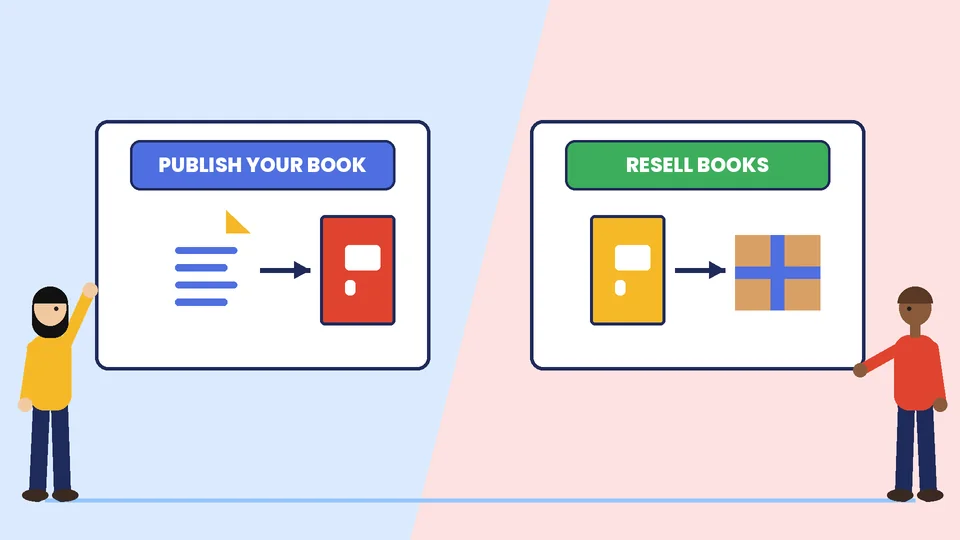
There are two main ways to sell books on Amazon. If you wrote the book, you can publish it through Kindle Direct Publishing (KDP) and earn a royalty on each sale, with Amazon printing paperbacks on demand. If you buy and resell books, you open an Amazon seller account, list each book against its catalog page and pay selling fees. The two routes use different tools, fees and skills, so pick one first. Neither one guarantees an income, and the old promise of a quick full-time living from books does not match what the official fee pages show.
This guide walks through both routes with the numbers Amazon publishes: KDP ebook and paperback royalties, ISBN rules, seller plan fees and the per-item fees on books. It ends with a launch checklist and the mistakes we see most often. At PROSeCommerce, part of PROS Global Inc in San Diego, we help online sellers plan marketplace channels, and the advice here comes from that work. Fees and rules were checked on Amazon’s own pages in November 2026 and can change, so confirm them before you commit money.
Route 1: publish your own book with KDP
KDP lets authors and small publishers upload a book and sell it on Amazon marketplaces. You choose the formats: ebook, paperback or hardcover.
How KDP ebook royalties work
KDP’s eBook royalties page describes two royalty options for each ebook: 35% and 70%. Under the 35% option, your royalty is 35% of the list price without VAT for each unit sold. Under the 70% option, you receive 70% of the list price without VAT, minus delivery costs, for eligible sales to customers in the 70% territories, and 35% for customers outside those territories. KDP’s help page says average delivery costs are $0.06 per unit and vary by file size. Both rates can show on your Bookshelf for the same book on Amazon.com, because the rate applied depends on where the buyer is located.
How KDP paperback royalties work
Paperback royalties are calculated differently. According to KDP’s paperback royalty page, KDP offers a 50% or 60% royalty rate on paperbacks sold on Amazon marketplaces that support paperback distribution, and the rate depends on your list price and the marketplace. On Amazon.com, the 50% rate applies at list prices of $9.98 or below and the 60% rate at $9.99 or above. KDP then subtracts the printing cost:
(Royalty rate × list price) − printing cost = royalty
KDP’s own example uses a $15 list price and a 333-page paperback with black ink sold on the US marketplace: (0.60 × $15) − $5.00 = $4.00. For paperbacks sold through Expanded Distribution channels, the rate is 40%, so the same book earns (0.40 × $15) − $5.00 = $1.00. KDP says printing cost depends on the marketplace, page count and ink type, and that trim size, bleed settings and cover finish do not affect it. You can set a price up to $250 on Amazon.com.
ISBN rules for KDP books
An ISBN is the number that identifies a book edition. KDP’s ISBN and imprint page says each format, such as paperback and hardcover, needs its own ISBN. Ebooks and low-content books are the only formats where an ISBN is optional. You can use a free ISBN from KDP or buy your own. A free KDP ISBN can only be used on KDP and cannot be used to publish elsewhere, and the imprint, which is the publisher name, will show as KDP’s. If you buy your own, the title, author and publisher details you enter in KDP must match the ISBN registration exactly, or you will not be able to publish. Decide early whether you want to keep control of your imprint and sell through other channels.
A simple KDP launch checklist
- Finish the manuscript. Edit it, proofread it and format it for the book type you chose.
- Design the cover. Match the final trim size and page count, and read KDP’s cover requirements before ordering artwork.
- Choose formats and ISBNs. Decide which formats to offer and how to handle ISBNs.
- Set prices. Use KDP’s printing cost and royalty calculator to see what you earn at each price.
- Order a proof copy. Check the printed layout and cover before you publish.
- Write the listing. Use a clear title, a subtitle that explains the benefit, a short description and accurate categories and keywords.
- Publish and review your reports. Check your sales and royalty reports and fix problems early.
Route 2: resell books as an Amazon seller
If you buy books to resell, you work as a third-party seller. The steps are different from publishing.
Choose a selling plan
Amazon’s selling plans and pricing page lists two plans. The Individual plan charges $0.99 per item sold, and the Professional plan charges $39.99 per month. Both also pay referral fees on each sale. As a rule of thumb, if you expect to sell more than about 40 items a month, the monthly plan costs less than the per-item fee, since 40 × $0.99 is $39.60. Amazon also notes that you can switch or cancel your plan at any time after registration.
Understand the fees on books
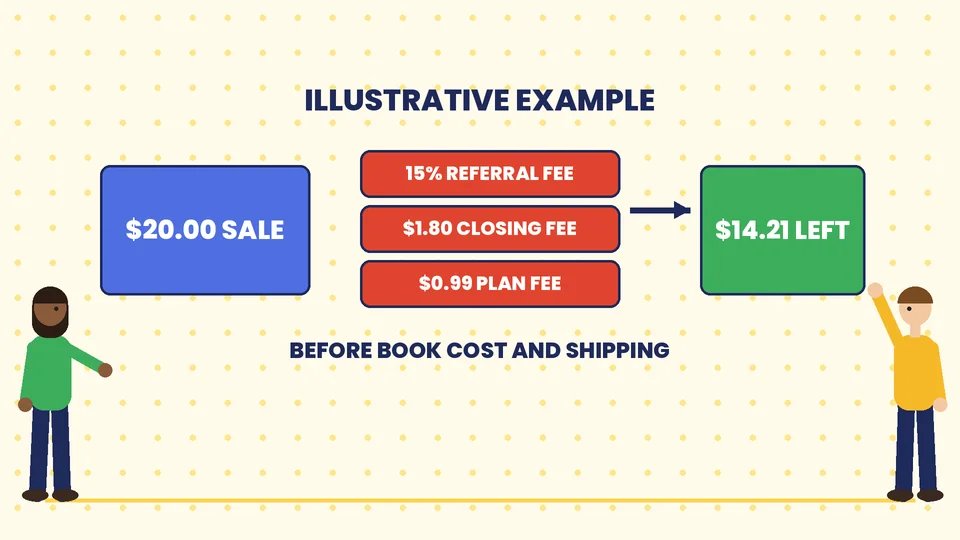
On Amazon’s fee schedule, the Media category, which includes books, DVDs, music, software and video, has a 15% referral fee. In addition to the referral fee, media items incur a closing fee of $1.80 per item. Fulfillment or shipping costs are separate, and they depend on whether you ship orders yourself or use Fulfillment by Amazon.
Here is an illustrative example, not a forecast. Say a book sells for $20.00 on the Individual plan and you ship it yourself:
| Item | Amount |
|---|---|
| Sale price | $20.00 |
| Referral fee (15%) | $3.00 |
| Closing fee | $1.80 |
| Individual plan fee | $0.99 |
| Left before book cost and shipping | $14.21 |
If the book cost you $6.00 and postage and packing cost $4.00, you keep about $4.21 before taxes and your own time. That is why margins, sourcing and speed of sale matter more for resellers than the headline price.
Pick books worth reselling
Sourcing is the part that decides profit. Follow a few habits:
- Check the current price and condition of competing offers before you buy stock.
- Work out your profit with fees and shipping included, not just the sale price.
- Buy small test lots before you commit to large quantities.
- Follow Amazon’s condition guidelines and listing rules, and describe each copy honestly.
- Track what sells and how fast, then repeat what works.
Compare the two routes
| Question | Publish with KDP | Resell as a seller |
|---|---|---|
| What do you sell? | Your own book | Books you buy |
| Main cost | Your time, editing, cover and marketing | Stock, fees, shipping and storage |
| How you earn | Royalty per sale | Sale price minus costs and fees |
| Printing | Amazon prints paperbacks on demand | You hold stock or use fulfillment |
| Control of the product | Full control of content | None, you resell existing editions |
| Best fit | Authors and niche publishers | People who enjoy sourcing and trading |
Marketing your book listing
Amazon is a crowded marketplace, so a listing alone rarely sells itself. A few practical steps help:
- Write for the buyer. Put the reader’s problem or promise in the first lines of the description.
- Use accurate categories and keywords. The goal is to appear when the right readers search.
- Collect honest reviews. Ask readers for feedback, and never pay for or fake reviews. Our guide to using customer reviews and social proof explains what works.
- Consider ads once the listing converts. Our guide on how to choose Amazon advertising covers ad types, costs and metrics.
- Build your own audience. An email list or a website you control protects you from marketplace changes. See our ecommerce marketing strategies for a practical plan.
If you outgrow the individual seller route, learn how Vendor Central differs from Seller Central, and how online marketplaces work in general. If you are weighing marketplaces against your own store, read about choosing an ecommerce business model.
A realistic first 90 days
A short plan keeps you honest about results. Adjust it for whichever route you picked:
- Days 1 to 30: set up. Open your KDP or seller account, decide on formats, prepare your first title or first small batch of stock and write clear listings.
- Days 31 to 60: launch and learn. Publish, then look at your reports each week. For authors, note which keywords and categories bring readers. For resellers, note which books sold fast and which sat unsold.
- Days 61 to 90: improve. Fix weak listings, adjust prices with the fee math in front of you and decide whether to add a second title, more stock or a modest ad test.
Keep a simple spreadsheet with price, fees, costs and profit per book. If the numbers do not work at small scale, they will not work at large scale.
Common mistakes to avoid
- Expecting a full-time income quickly. Most books sell slowly at first. Plan for a long build and a budget for editing, design and marketing.
- Ignoring printing cost. A low price on a long paperback can leave almost no royalty. Check the calculator before you set the price.
- Mixing up ISBN and imprint details. Mismatches stop publishing. Enter the details exactly as registered.
- Forgetting fees in resale math. Referral, closing, plan and shipping costs add up quickly on low-priced books.
- Putting everything on one marketplace. Policies and fees change, so keep your customer relationships and content portable.
- Skipping the proof copy. A cover or layout error is cheaper to catch before launch than after.
Frequently asked questions
Can I make a full-time income selling books on Amazon?
How much do KDP authors earn per book?
Do I need an ISBN to sell a book on Amazon?
What does it cost to sell books as a third-party seller?
Is KDP or reselling better for beginners?
Do Amazon fees change?
Start with one route and measure
Selling books on Amazon works best when you choose a single route, learn its numbers and improve from real results. If you want help planning marketplace channels alongside your own store, contact PROSeCommerce and we will help you choose a sensible next step.