

Which plan most growing brands should be on
For most single-brand US stores, Shopify Advanced is the right plan until you need something only Shopify Plus can do. Advanced costs $299 a month billed yearly ($399 month to month). Plus starts at $2,300 a month on a three-year term or $2,500 on a one-year term. That’s roughly $2,000 a month more, and Plus earns it when you need one of a short list of things: changes to the information, shipping, or payment steps of checkout; custom Shopify Functions; B2B pricing by company or more than three B2B catalogs; extra stores for the same brand; or more API headroom for heavy integrations. Revenue alone isn’t a good reason to upgrade. A specific capability with a dollar value attached is.
This guide from PROSeCommerce, a San Diego Shopify and Magento agency that’s part of PROS Global covers what each plan includes as of October 2026, where the real differences are, and how to run the math for your own store.
Advanced vs. Plus at a glance
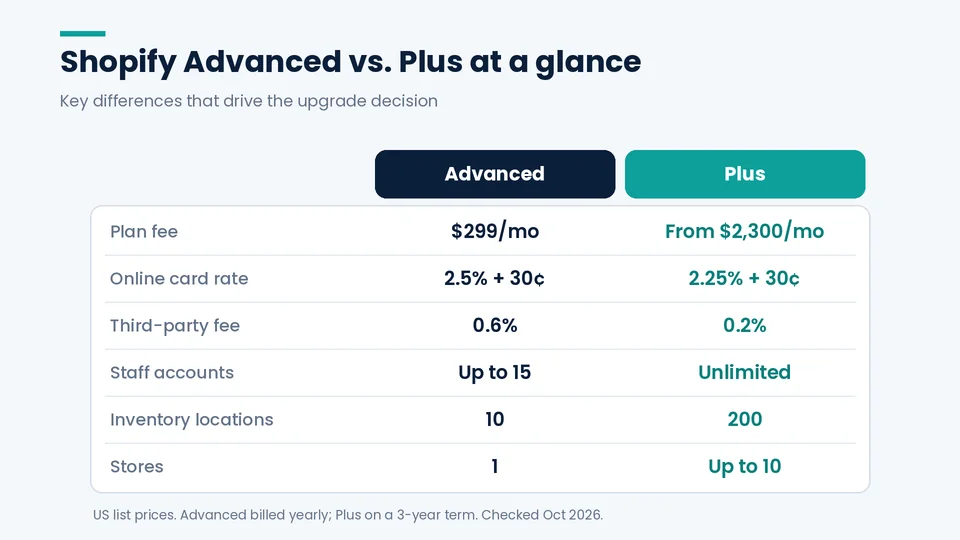
Shopify Advanced is the highest standard plan, at $299 a month billed yearly, and Shopify Plus is the enterprise plan, starting at $2,300 a month on a three-year term or $2,500 on a one-year term as of October 2026 (Shopify Plus pricing). Plus adds lower third-party fees, higher API limits, unlimited staff accounts, and expansion stores.
All figures below come from Shopify’s US pricing page, the Shopify Plus pricing page, the Help Center, and Shopify’s developer documentation, checked in October 2026.
| Shopify Advanced | Shopify Plus | |
|---|---|---|
| Plan fee | $299/mo billed yearly, $399/mo monthly | From $2,300/mo (3-year term) or $2,500/mo (1-year term); variable fee for complex, high-volume businesses |
| Online standard card rate (Shopify Payments) | 2.5% + 30¢ | 2.25% + 30¢ (Shopify notes Plus rates vary by region) |
| Third-party transaction fee | 0.6% | 0.2% |
| Staff accounts | Up to 15 | Unlimited, plus custom user groups |
| Inventory locations | 10 | 200 |
| Checkout customization | Branding and app blocks on Thank you and Order status pages; checkout and accounts customization by market | Apps on information, shipping, and payment steps; Checkout Branding API; separate B2B and D2C checkout flows |
| Shopify Functions | Functions inside public App Store apps | Also custom apps you build with Functions |
| B2B catalogs | Up to 3 active catalogs across B2B markets | Unlimited, including catalogs assigned to specific companies |
| Stores | One store | Main store plus up to 9 expansion stores for the same brand |
| GraphQL Admin API rate | 200 points/second | 1,000 points/second |
| Headless storefronts | 1 | 25 |
| URL redirects | Up to 100,000 | Up to 20,000,000 |
| POS Pro | $89/mo per location | First 20 locations included |
| Support | Enhanced 24/7 chat | Priority 24/7 support |
What Advanced already covers
A lot of features that used to be “Plus only” now reach Advanced, which is why many brands can stay there longer than they expect.
- Up to 15 staff accounts, enough for most small and mid-size teams.
- Live third-party (carrier-calculated) shipping rates at checkout.
- Custom reports and predicted values in analytics.
- Market-level customization. Advanced lets you customize your theme and your checkout and accounts pages for each market, which Basic and Grow can’t do.
- B2B basics. Since B2B opened to all plans, Advanced includes companies, company locations, net payment terms, quantity rules, volume pricing, and up to three active B2B catalogs. Advanced and Plus also support showing B2B buyers different storefront content.
- Shopify Flow for automation, and public apps that use Shopify Functions for discounts, delivery, and payment rules.
- Up to 2x API rate limits on select APIs compared with lower plans.
If your requirements fit inside that list, Advanced will usually serve you well. The honest trade-offs of the platform as a whole, Plus included, are in our review of Shopify’s disadvantages and limitations.
Capabilities you only get on Shopify Plus
Shopify Plus is the plan for brands that need control Advanced doesn’t offer: app extensions on the information, shipping, and payment steps of checkout, custom apps built on Shopify Functions, company-level B2B pricing with unlimited catalogs, and up to nine expansion stores for the same brand. If none of those matter yet, stay on Advanced.
Checkout steps and branding
On Advanced, you can brand checkout and add app blocks to the Thank you and Order status pages. Plus adds app extensions on the information, shipping, and payment steps, the Checkout Branding API, checkout blocks that differ by market, and separate checkout experiences for B2B and DTC buyers in the same store. If your growth plan includes things like custom fields at checkout, delivery-date pickers, or payment rules shown at the payment step, this is the main reason to upgrade.
Custom logic with Shopify Functions
Shopify Functions let developers change Shopify’s back-end logic for discounts, delivery options, payment methods, cart validation, and order routing. Shopify’s developer docs state that any plan can use public apps that contain Functions, but only Plus stores can use custom apps built with Function APIs. Shopify Scripts, the older Plus-only customization tool, stopped running on June 30, 2026, so Functions are now the path for custom checkout logic.
B2B at contract scale
Advanced’s three-catalog limit is fine for a simple wholesale tier or two. Plus removes the limit, lets you assign catalogs directly to specific companies and company locations for customer-level pricing, and adds deposits, partial payments, and payment requests per fulfillment. Wholesalers with negotiated pricing per account usually hit this wall first. Our older overview of Shopify Plus for B2B merchants covers the background; the plan details above reflect Shopify’s current Help Center.
Expansion stores and organization admin
Plus includes your main store plus nine expansion stores, with additional stores at $300 a month each or a revenue share. They must be the same brand: Shopify requires a separate Plus contract for each brand. Expansion stores are useful when one store with Markets isn’t enough, for example a dedicated wholesale store or a region that needs its own catalog and operations. Selling internationally from a single store is often simpler, and our post on Shopify Plus for international retailers covers the trade-offs.
Flash sales and launch tools
Plus adds Launchpad for scheduling sales, product releases, and theme changes; bot protection during high-demand drops; and what Shopify calls high-volume checkout. Shopify also lists Shopify Audiences and combined listings (showing variant-style options across separate products) as Plus-only.
API headroom and data scale
Shopify’s GraphQL Admin API allows 1,000 points per second on Plus versus 200 on Advanced. Plus stores are also exempt from the daily variant-creation limit that applies once a store has 500,000 variants, and can hold up to 20 million URL redirects. These matter for large catalogs, frequent ERP or PIM syncs, and big replatforming projects.
Admin, testing, and support
Plus includes unlimited staff, custom user groups, unlimited staging stores, room for up to 100 themes, 1 TB of file storage, priority 24/7 support, the ability to suppress specific customer notification emails, and Plus-only APIs such as Multipass and gift card management.
Running the break-even math
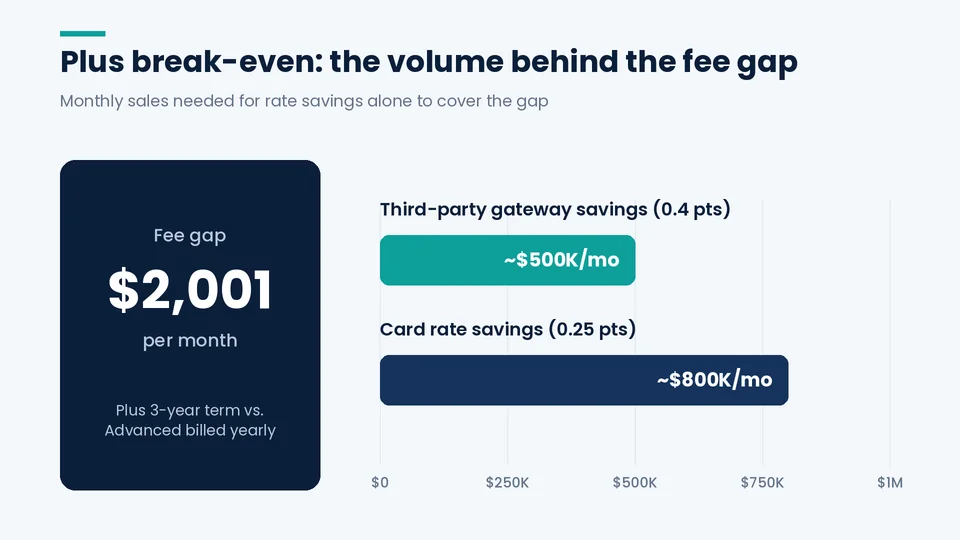
The break-even point for Shopify Plus is where the monthly value of what Plus unlocks exceeds the fee gap. On US list prices as of October 2026, that gap is about $2,001 a month on a three-year Plus term, so card-rate savings, lower gateway fees, extra stores, and included POS locations have to add up past it.
The plan fee gap is the starting point:
- Plus three-year ($2,300) minus Advanced billed yearly ($299) = $2,001 a month.
- Plus one-year ($2,500) minus Advanced billed yearly = $2,201 a month.
Then look at what Plus saves or replaces. The figures below use Shopify’s published US list rates; your actual Plus rates may differ by region, so confirm them with Shopify.
Card-rate savings. The online standard card rate drops from 2.5% to 2.25%, a 0.25-point difference. To cover $2,001 from that alone, you’d need about $800,000 a month in online standard card volume through Shopify Payments. Most brands considering Plus aren’t there yet, which is why card savings alone rarely justify the upgrade.
Third-party gateway savings. If you process through an outside provider, the Shopify fee drops from 0.6% to 0.2%. Covering $2,001 with that 0.4-point difference takes roughly $500,000 a month in gateway volume.
Stores you’d otherwise pay for. Two Advanced stores cost $598 a month billed yearly and three cost $897, each with its own admin. If you need a separate wholesale or regional store, the effective gap to Plus shrinks.
POS and apps. POS Pro costs $89 a month per location on Advanced, and Plus includes the first 20 locations. Five retail locations is $445 a month on Advanced. Add any apps that Plus features would replace, such as a wholesale app or a launch-scheduling tool.
Revenue from Plus-only features. This is the number that usually decides it. If a checkout change, a B2B portal, or a faster ERP sync is worth more than the fee gap, the upgrade pays for itself. If you can’t name that change and estimate its value, wait.
Shopify’s own upgrade FAQ says brands typically upgrade when online sales reach about $80,000 a month, while noting needs vary. Treat that as a conversation starter, not a rule.
Signals it’s time to upgrade
- Your checkout needs fields, rules, or app blocks on the information, shipping, or payment steps.
- You need custom discount, shipping, or payment logic that no public app handles.
- Your wholesale accounts need their own price lists, or you need more than three B2B catalogs.
- You need a second store for the same brand (wholesale, a region, or an outlet).
- Integrations are hitting API limits or your catalog is past 500,000 variants.
- You run frequent product drops and need scheduling and bot protection.
- Your retail footprint is large enough that included POS Pro locations change the math.
Reasons to stay on Advanced for now
- Your checkout needs are covered by branding and the Thank you and Order status pages.
- Your B2B program fits in three catalogs.
- One store with Markets handles every country you sell to.
- Your apps cover your discount and shipping rules.
- You’d be committing to a one- or three-year term to buy features you might use later.
Many problems that feel like platform limits are actually theme or app problems. A slow storefront, for example, won’t get faster just by changing plans; our guide on how to speed up your Shopify store covers what does help.
What changes when you move from Advanced to Plus
Upgrading doesn’t require a migration. Your store, theme, products, and customers stay where they are. Based on Shopify’s upgrade page and Plus documentation, plan for:
- A term commitment. Plus is sold on one- or three-year terms, and you can cancel when the term ends. The person with signing authority for the business has to complete the upgrade.
- A short switchover. Shopify says it upgrades the store within 24 business hours of sign-up and sends onboarding details. The first Plus bill comes 30 days after you accept the Plus terms, and any prepaid annual fee for your old plan can be credited.
- Checkout configuration. Plan which app extensions and branding changes you’ll add, and test them in a draft checkout configuration before publishing.
- Functions development. If custom logic is the reason you upgraded, budget for a developer to build, test, and maintain the custom app.
- Integration updates. Raise sync frequency or batch sizes where the higher API limits help, and set up expansion stores or B2B catalogs if they’re part of the plan.
If you’re choosing a partner for that work, our checklist on how to choose a Shopify Plus development agency covers what to ask.
Advanced or Plus: a decision checklist
When the PROSeCommerce team helps a brand weigh this upgrade, we start with these questions rather than with revenue, because the answers point to the specific Plus features that would have to pay for themselves.
Answer each question with yes or no:
- Do you need changes on the information, shipping, or payment steps of checkout?
- Do you need custom Functions that no public app provides?
- Do you need more than three B2B catalogs or pricing by company?
- Do you need more than one store for the same brand?
- Are API limits slowing your ERP, PIM, or OMS integrations?
- Would included POS Pro locations save you more than a few hundred dollars a month?
- Can you put a monthly dollar value on at least one Plus-only feature that’s larger than the fee gap?
If you answered yes to question 7 and to at least one other, Plus is worth a serious look. If not, Advanced is probably the better use of the money for now.
Frequently asked questions about Advanced and Plus
How much more does Shopify Plus cost than Advanced?
Based on Shopify’s US list prices, Plus costs about $2,001 a month more than Advanced billed yearly on a three-year Plus term ($2,300 vs. $299), or about $2,201 more on a one-year term. More complex, high-volume businesses may be moved to a variable platform fee based on revenue.
Does Shopify Plus require a long contract?
Yes. Shopify Plus is sold on one-year or three-year terms, and the three-year term has the lower monthly fee. Shopify’s pricing FAQ says you can cancel a Plus subscription when your term commitment expires.
Can I sell wholesale on Shopify Advanced?
Yes. B2B is available on all plans, and Advanced includes company profiles, payment terms, volume pricing, and up to three active B2B catalogs. You need Plus for unlimited catalogs, catalogs assigned to specific companies, deposits, and partial payments.
At what revenue should a store move to Shopify Plus?
There’s no fixed number. Shopify says brands typically upgrade at about $80,000 a month in online sales, but the better test is whether a Plus-only capability, such as checkout customization or company-level B2B pricing, is worth more to you than the extra fee.
Will upgrading to Plus make my storefront faster?
Not by itself. Your theme and apps drive storefront speed on every plan. Plus adds checkout and launch capacity, bot protection, and higher API limits, but a slow theme on Advanced will still be slow on Plus until the theme and apps are fixed.
Do I still need Plus to customize discounts now that Shopify Scripts are gone?
Not always. Shopify Scripts stopped running on June 30, 2026, and their replacement, Shopify Functions, works on every plan through public App Store apps. You need Plus only if you want a custom app built with Functions for your own store.
Making the call between Advanced and Plus
Advanced is a capable plan, and staying on it longer is often the smarter financial move. Plus is worth it when it removes a specific limit that’s costing you sales, staff time, or integration headaches. Write that limit down, put a number on it, and compare it with the fee gap.
If you’d like help pressure-testing the decision, PROSeCommerce works with brands on both plans, from Shopify development and integrations to Plus checkout and B2B builds. We’re happy to look at your setup and tell you which plan fits, including when the answer is to stay where you are.