

How to use this Shopify SEO checklist
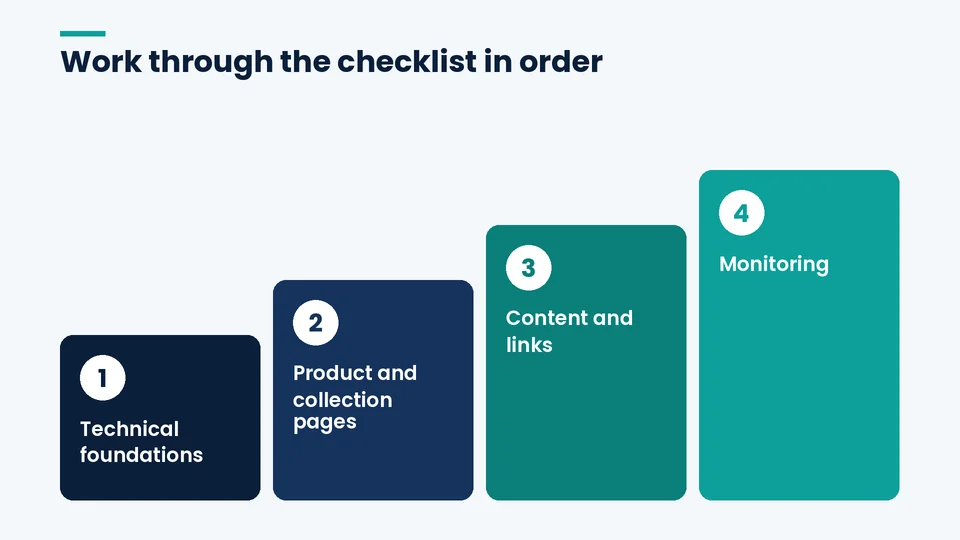
A Shopify SEO checklist is a repeatable list of checks that confirms search engines can crawl, understand, and rank your store’s pages. Work through it in order: technical foundations first, then product and collection pages, then content and links, then monitoring. Each layer depends on the one before it.
Shopify takes care of more technical SEO than most platforms, so the checklist below skips generic advice and focuses on the settings, templates, and habits that actually move Shopify stores. At PROSeCommerce, part of PROS Global, a San Diego Shopify and Magento agency, this is the order we use when we audit a store. Every Shopify and Google detail below was checked against their official documentation as of October 2026.
If you want the background behind each item, our complete guide to SEO for Shopify stores explains the concepts. This page is the working list.
What Shopify already handles for you
Before you start fixing things, know what’s on by default so you don’t pay for an app or a developer to duplicate it:
- Sitemaps. Shopify generates a sitemap.xml file at the root of your domain that links to separate sitemaps for products, collections, blogs, and pages, and updates it automatically, per Shopify’s sitemap help article.
- robots.txt. Every store has a default robots.txt file that keeps crawlers out of the admin, cart, checkout, account pages, and filtered or sorted collection URLs, according to Shopify’s guide to editing robots.txt.liquid.
- Canonical tags and HTTPS. Shopify adds canonical tags automatically, and domains connected to Shopify get a free SSL certificate, with traffic redirected to HTTPS, as Shopify explains in its ecommerce SEO audit guide.
- Product structured data. Shopify’s Liquid structured_data filter outputs products as schema.org Product or ProductGroup markup (depending on variants) and blog posts as Article markup. Whether it appears on your pages depends on your theme.
That leaves the work that only you can do: telling Google about the store, keeping the crawl clean, writing pages people want, and checking that nothing breaks over time.
Technical checks
Technical SEO on Shopify is mostly about confirming the defaults are working and that themes, apps, and old URLs haven’t undermined them. Run these checks at launch, after any theme change, app install, or migration, and at least once a quarter, even when traffic looks stable.
1. Verify the store in Google Search Console and submit the sitemap
Add your domain as a property in Google Search Console, verify it (Shopify’s help article walks through the HTML tag method in theme.liquid), and submit yourdomain.com/sitemap.xml. Make sure the store isn’t in private mode, because Google can’t read the sitemap while it’s on. Shopify notes that Google doesn’t guarantee how long crawling and indexing take.
2. Confirm one primary domain
Pick a single primary domain and make sure every other domain you own redirects to it, unless you’re using extra domains for international markets. Shopify’s sitemap documentation says to redirect non-international domains to the primary domain so search engines don’t treat them as separate sites.
3. Leave robots.txt alone unless you have a specific reason
Shopify’s default rules are sensible for most stores. If you do need changes, such as blocking a specific crawler or a filter pattern, add a robots.txt.liquid template and edit it with Liquid so Shopify can keep updating the defaults. Shopify calls this an unsupported customization and warns that incorrect edits can cost you all of your traffic. An “Indexed, though blocked by robots.txt” message in Search Console is usually normal for URLs Shopify blocks on purpose.
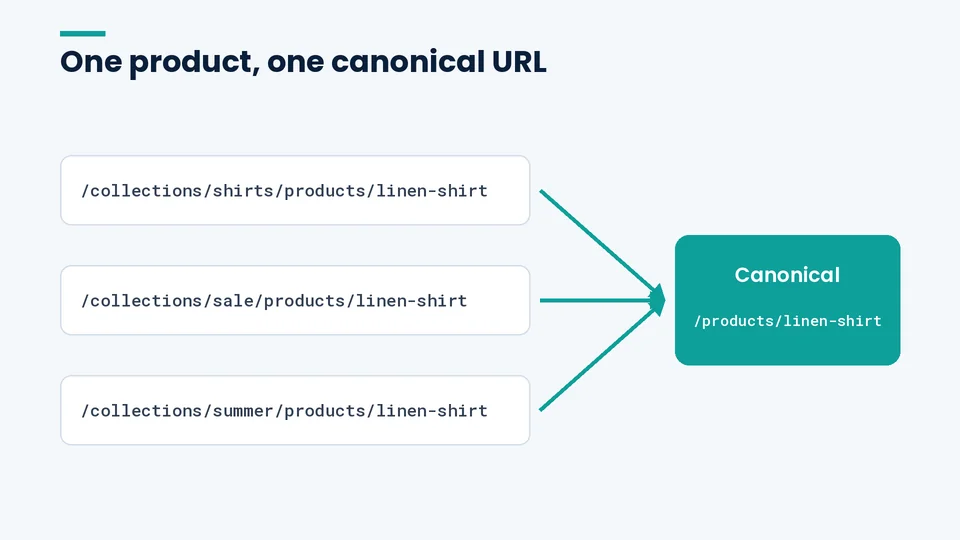
4. Check canonical tags on product URLs
Shopify can show the same product at /products/handle and at a collection path such as /collections/shirts/products/handle. Shopify’s audit guide says the canonical tag on collection-based product URLs should point to the /products/ URL. Spot-check a few products in the URL Inspection tool to confirm Google picked the canonical you expect.
5. Keep filtered, sorted, and tag URLs out of your internal links
Filters, sort orders, and tag-filtered collection URLs can multiply into thousands of near-duplicate pages. Shopify’s robots.txt already disallows the common filter and sort patterns. Your job is to avoid linking to those URLs from menus, footers, and blog posts. Link to real collections instead.
6. Measure Core Web Vitals on real templates
Google’s Core Web Vitals guidance treats an LCP within 2.5 seconds, an INP under 200 milliseconds, and a CLS under 0.1 as good. Check your home page, a top collection, and a top product page in Search Console and PageSpeed Insights. On Shopify, most slowdowns come from apps and heavy media, which our guide on how to speed up your Shopify store covers step by step.
7. Validate product structured data
Run a few product URLs through Google’s Rich Results Test. Look for the price, availability, and image fields you expect, and for errors introduced by apps that add a second, conflicting Product block. Keep review markup honest: Google’s review snippet guidelines say not to include fake or undisclosed incentivized reviews.
On-page checks for products and collections
Product and collection pages are where Shopify stores earn most of their organic revenue, so this is where most of the writing effort belongs. The goal is a page that clearly answers what the product is, who it’s for, and why to buy it here, with a title and description that match.
8. Write a unique title tag for every important page
Shopify’s keyword guidance recommends keeping titles to 60 characters or fewer, though the field accepts 70. Put the main product or category term near the start, add a distinguishing detail such as material or use, and avoid repeating the same boilerplate across hundreds of products, which Google’s title link guidance specifically warns against.
9. Write meta descriptions people want to click
Shopify suggests about 160 characters. Describe what’s on the page in plain language and include the terms a shopper would use. Google may rewrite descriptions, so treat them as your best summary rather than a ranking lever.
10. Replace manufacturer copy with your own product descriptions
Copied supplier text appears on every other retailer’s site. Write original descriptions that cover fit, materials, use cases, care, and the questions your customer service team actually gets. For page structure that converts as well as ranks, see our guide to building a high-converting product page on Shopify.
11. Give collections a short, useful introduction
A collection page with only a product grid gives Google little to understand. Add a short introduction that explains the range and helps shoppers choose, and keep it above or below the grid so it doesn’t push products off screen on mobile.
12. Use one clear H1 and logical subheadings
Shopify themes typically print the product or collection title as the H1. Check that your theme isn’t also wrapping the logo or a banner in an H1, and use H2 and H3 headings for sections such as features, sizing, and FAQs.
13. Write descriptive alt text and file names for images
Shopify lets you add alt text to product, collection, and blog images. Describe what the image shows, such as “Navy linen shirt with a button-down collar, front view,” rather than stuffing keywords. Google’s image SEO guidance also recommends short, descriptive file names.
14. Keep URL handles short and stable
Shopify creates handles from titles. Shorten long ones before launch to a few hyphenated words, then leave them alone. Changing a live handle means the old URL needs a redirect.
Site structure and internal links
A clear structure helps shoppers and crawlers find your important pages in a few clicks. On Shopify that means a deliberate collection hierarchy and menus that reflect how customers shop, not how your warehouse is organized.
15. Build menus around your main collections
Link your top-level collections from the main menu, and use sub-collections for important categories rather than relying on filters. Keep the footer for policies, support, and secondary pages.
16. Link from blog posts and guides to collections and products
Buying guides and how-to posts are often the pages that earn links. Pass that value on with natural, descriptive links to the collections and products the post discusses, and link related posts to each other.
17. Fix broken internal links and orphan pages
Crawl the store with an SEO crawler every quarter. Fix links that point to deleted products or old handles, and make sure every collection and important product is linked from somewhere other than the sitemap.
Content that earns rankings
Shopify’s built-in blog is enough for most stores. What matters is publishing content that’s genuinely useful to your buyers, not volume. Google’s guidance on helpful, people-first content asks whether content shows first-hand expertise and leaves readers feeling they learned enough to reach their goal.
18. Publish buying guides and comparisons your customers ask for
Start with the questions your support team hears every week: sizing, compatibility, care, comparisons between your own products. Each answer can become a guide that links to the relevant collection.
19. Avoid thin and near-duplicate pages
Don’t create a page for every keyword variation or city name. Google’s spam policies treat pages generated mainly to manipulate rankings as scaled content abuse. Consolidate thin pages into fewer, stronger ones and redirect the old URLs.
Redirects and migrations
Redirects protect rankings when URLs change, whether you’re renaming a product or moving the whole store from another platform. Shopify’s URL redirect rules allow up to 100,000 redirects on standard plans and up to 20 million on Plus, and redirects only work from URLs that return a 404.
20. Redirect every removed or renamed URL
When you delete a product, redirect its URL to the closest replacement or its collection, not the home page. Shopify won’t let you redirect the fixed paths /products, /collections, or /collections/all, and you can import redirects in bulk with a CSV file. Shopify’s fixed URL prefixes are one of the trade-offs we cover in our list of Shopify’s disadvantages.
21. Map every old URL before a platform move
A migration is where most stores lose organic traffic. Export every old URL from your crawl, Search Console, and analytics, map each one to its new Shopify URL, and test the redirects before launch. Our checklists for Magento to Shopify and WooCommerce to Shopify migrations cover the full redirect process.
Search features beyond the blue links
Organic visibility now includes Shopping results, images, and AI features in Search. You don’t need special tricks for them. Google’s guidance on AI features says SEO best practices remain relevant and there are no additional requirements to appear in AI Overviews or AI Mode. A few Shopify-specific steps help:
- Product feeds. Shopify’s free-to-install Google & YouTube app syncs products to Google Merchant Center, which can help your products appear in Shopping surfaces. Keep titles, prices, availability, and identifiers accurate in both places.
- On-site search. Shopify’s free Search & Discovery app lets you set up filters, synonym groups, and product boosts. It improves the shopping experience once people land, which supports conversions from organic traffic.
- AI crawlers. Shopify’s robots.txt help article explains that blocking AI crawlers in robots.txt affects only open-web discovery and doesn’t stop Shopify Catalog from sharing product data with agentic storefronts you’ve activated. Decide on purpose rather than by accident.
A monitoring rhythm that catches problems early
SEO problems on Shopify usually arrive with change: a new theme, a new app, a catalog import, or a migration. A simple schedule, owned by one named person on your team, catches most of them before they cost you traffic or sales.
| How often | What to check |
|---|---|
| Weekly | Search Console page indexing errors, sudden drops in clicks for top pages, 404s for important URLs |
| Monthly | Core Web Vitals for key templates, new products missing titles, descriptions, or alt text, broken internal links |
| Quarterly | Full site crawl, structured data validation, redirect list review, thin or duplicate pages to consolidate |
| After any theme, app, or migration change | Canonical tags, robots.txt, structured data, page speed, and a spot check of key pages in URL Inspection |
Google’s Search Central team also published two free learning paths for Search fundamentals and technical SEO on October 6, 2026, which are a good way to train anyone on your team who owns this schedule.
Frequently asked questions about Shopify SEO
Is Shopify good for SEO?
Does Shopify create a sitemap automatically?
Can you edit robots.txt on Shopify?
Do Shopify product tags help SEO?
How long does Shopify SEO take to show results?
Do I need an SEO app for Shopify?
Putting the checklist to work
Shopify gives you a strong technical starting point. Rankings come from what you build on top of it: clean crawl paths, product and collection pages written for buyers, content that answers real questions, and a habit of checking after every change.
If you’d like a second set of eyes on your store, PROSeCommerce can run this checklist against your Shopify site and give you a prioritized list of fixes. Learn more about our ecommerce SEO and marketing services.