
What makes an ecommerce payment gateway secure?
A secure ecommerce payment gateway keeps card data away from your own servers, encrypts it in transit, checks each payment for fraud, and is validated against the PCI DSS standard. In practice that means hosted or tokenized payment fields, 3-D Secure support, address and card code checks, clear fraud and chargeback tools, and an up-to-date PCI attestation you can ask the provider to show you. Security is only one part of the choice, so weigh it next to fees, supported payment methods, payout speed and how well the gateway fits your platform.
This guide explains what a payment gateway does, the security features worth checking, how your integration type changes your PCI workload, how to compare providers and what to ask before you sign up. At PROSeCommerce, part of PROS Global Inc in San Diego, we set up and support online stores, and the checklist below reflects the questions we ask when a store picks or changes a gateway. Platform and standards details were checked against official sources as of November 2026.
How a payment gateway moves a payment
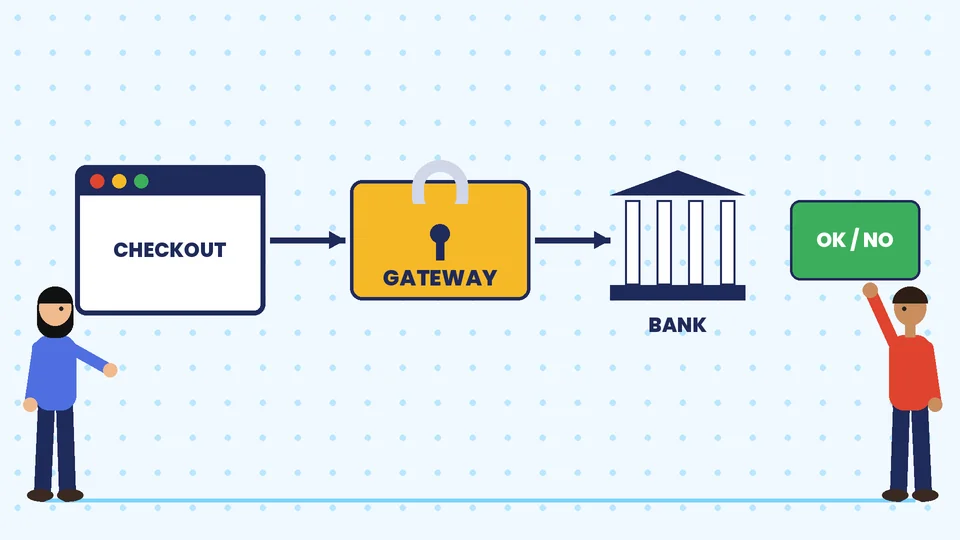
A payment gateway is the service that securely passes a customer’s payment details from your checkout to the payment processor and the card networks, then returns an approval or a decline. The customer enters card details, the gateway encrypts and sends them for authorization, and your store receives the result. A payment processor and a merchant account sit behind that step and move the money. Some providers bundle all three, which Shopify Payments does, while others handle only part of the chain. Our guide to Shopify’s merchant account, fees and payouts explains how those pieces fit together on Shopify.
The gateway matters for security because it is the point where the most sensitive data passes through. A weak gateway, or a careless integration with a good one, is how card data ends up where it should never be.
Security features to look for
Use these as a checklist when you compare gateways. Every item should be something the provider documents, not just a marketing line.
| Feature | What it does | What to ask |
|---|---|---|
| Encryption in transit | Protects card data between the customer, the gateway and the bank | Is TLS enforced on every payment page and API call? |
| Tokenization | Replaces the card number with a token you can store safely | Can I charge returning customers without storing card numbers? |
| Hosted or embedded payment fields | Keeps card entry on the provider’s servers | Do payment fields come from the provider’s domain? |
| 3-D Secure support | Adds a bank authentication step for some card payments | Is it supported, and can I control when it is triggered? |
| Address and card code checks | Compares billing address and security code with the card issuer’s records | Are results visible, and can I set rules on them? |
| Fraud screening | Scores payments and flags risky orders | Can I review, approve or cancel flagged orders? |
| Chargeback tools | Helps you respond to disputes with evidence | How are disputes delivered and how long do I have to respond? |
| Access controls | Limits who in your team can see or refund payments | Are there separate user roles and two-step sign-in? |
| PCI DSS validation | Shows the provider meets the card industry standard | Can I see the current Attestation of Compliance? |
None of these features guarantees you will avoid fraud. Fraud tools reduce risk, and they also produce false positives that block real customers, so review their settings and results regularly instead of leaving everything on default.
PCI DSS and your integration type
The Payment Card Industry Data Security Standard (PCI DSS) applies to anyone who accepts card payments. How much work it creates for you depends heavily on how your checkout is built. The PCI Security Standards Council publishes a short self-assessment questionnaire, called SAQ A, for merchants who completely outsource card handling.
According to the PCI SSC FAQ on payment pages, to be eligible for SAQ A all elements of the payment pages must originate only from a PCI DSS compliant service provider, and no single element of a payment page can come from the merchant’s own website. The SAQ A form adds that you must not store, process or transmit account data electronically on your systems, and that you must have reviewed your provider’s Attestation of Compliance.
Where the payment form is embedded in your page, for example in an iframe, the PCI council says in its blog on SAQ A eligibility that you also need to confirm your page is not susceptible to script attacks, either through your own controls or by getting confirmation from your provider. Redirecting customers to the provider’s hosted page does not trigger that script criterion.
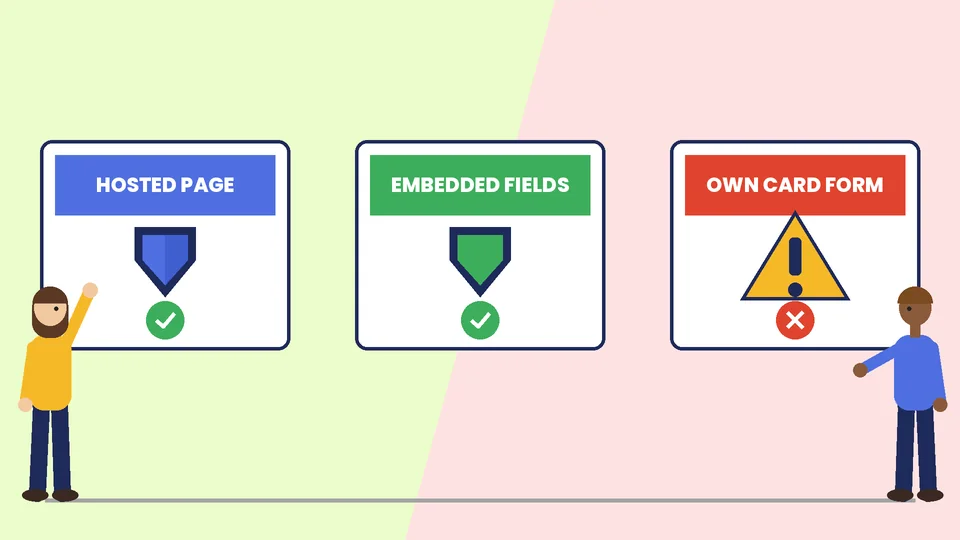
| Integration type | Where card data is entered | Typical PCI effort for you |
|---|---|---|
| Redirect to a hosted payment page | On the provider’s site | Lowest, usually SAQ A if every other criterion is met |
| Embedded fields (iframe) from the provider | On a form delivered by the provider inside your page | Low, plus protecting your page from scripts |
| Payment form built on your own site | On your server | Highest, since your systems are in scope |
The practical advice is to avoid building your own card form. Whatever you choose, confirm the correct questionnaire with your acquirer or payment provider, because eligibility depends on meeting every criterion, not only one.
Hosted checkout versus on-site checkout
Shopify supports two kinds of third-party card providers. As the Shopify Help Center explains, with a direct provider customers complete their purchase on your online store, and with an external provider they pay on a checkout page hosted outside your store. External pages move more of the security work off your store, but they can feel disconnected and may lose some customers at the hand-off. Direct providers keep the buying experience in one place. Test both flows on a phone before you decide.
How to compare payment gateways
Security is a baseline, so compare providers on the rest as well:
- Fees. Look at the percentage and fixed fee per transaction, plus monthly fees, setup fees, chargeback fees and currency conversion charges. On Shopify, third-party transaction fees apply to payments processed through third-party gateways, even when Shopify Payments is turned on, according to Shopify’s page on third-party providers.
- Platform fit. Shopify says you can choose from over 100 credit card providers, and some restrictions apply. For example, if your store is in the United States and Shopify manages your US sales tax, you cannot use third-party providers, and stores that sell subscriptions must use Shopify Payments as their primary gateway.
- Payment methods. Check cards, wallets such as Apple Pay and Google Pay, bank transfers and local methods in the countries you serve. Shopify notes that accelerated checkout buttons from providers such as PayPal, Amazon Pay, Apple Pay and Google Pay are available on Shopify stores.
- Countries and currencies. Gateways are available in specific countries and support specific currencies, so check both for your business and your customers.
- Payout timing and reserves. Ask how quickly funds reach your bank and whether the provider can hold a reserve.
- Reliability and support. Ask about uptime history, status pages and how to reach a human when payments fail.
For a wider look at how plans and payment choices affect cost, read Shopify plans explained.
Questions to ask before you sign up
- Which PCI DSS level and attestation date can you show me?
- Do card details ever touch my server with your recommended integration?
- How do you support 3-D Secure and strong customer authentication where it is required?
- What fraud tools are included and what do they cost?
- How do chargebacks work, and what evidence can I submit?
- What are all the fees, including cross-border and currency conversion?
- How soon are payouts made, and under what conditions can funds be held?
- Can I export my customers’ payment tokens if I leave?
The last question is easy to forget. If tokens are locked to one provider, moving gateways later can mean asking every customer to re-enter their card.
Keep your store secure beyond the gateway
A secure gateway does not protect an insecure store. Keep your platform, theme and apps updated, limit admin access, use unique passwords with two-step sign-in and review the third-party scripts on your checkout. Our overview of ecommerce security and PCI DSS goes into those threats in more detail. And since checkout friction costs sales, see how to find the leaks in your Shopify conversion funnel.
This article is general information about PCI DSS and payment security, not legal or compliance advice. Confirm the right questionnaire and obligations with your payment provider or acquirer.
Common payment gateway mistakes
- Choosing only on the lowest fee and ignoring chargeback and cross-border charges.
- Building a custom card form when a hosted option would reduce risk.
- Never testing checkout on a phone.
- Leaving fraud settings on default and never reviewing declined orders.
- Not keeping a record of the provider’s current PCI attestation.
- Having only one payment method with no backup if the gateway has an outage.
Frequently asked questions
What is a payment gateway in ecommerce?
What security features should a payment gateway have?
Is a payment gateway the same as a merchant account?
Do I need to be PCI compliant if I use a hosted payment page?
Can I use more than one payment gateway on Shopify?
How do I reduce chargebacks and payment fraud?
Pick a gateway you can explain to your customers
The right gateway keeps card data off your systems, fits your platform and costs what you expected. Compare providers on security features and PCI documentation first, then on fees, methods and payouts, and test the whole checkout before you launch. If you want help choosing or setting up payments on Shopify, contact PROSeCommerce.