

Do you need a merchant account to sell on Shopify?
In most cases, no. If your business is in one of the countries Shopify Payments supports, including the US, Shopify Payments processes your card payments directly, so you don’t apply for a separate merchant account or connect gateway credentials. You need an outside provider only when Shopify Payments isn’t available for your country or business type.
A merchant account is a bank account that lets a business accept card payments, and a payment gateway is the service that carries card details from checkout to the processor that approves them. On older platforms you arranged both yourself. Shopify’s Help Center puts it plainly: Shopify Payments “eliminates the hassle of setting up a third-party payment provider or merchant account.”
At PROSeCommerce, part of PROS Global, a San Diego Shopify and Magento agency, payment setup is one of the last things we configure before a store launches and one of the first things we audit after a migration, because a wrong choice shows up on every single order. This guide explains how Shopify Payments works, what it costs on each plan, when a third-party gateway still makes sense, and how payouts and chargebacks work. Rates and rules are from Shopify’s pricing page, Help Center, and US payments terms as of October 2026.
How Shopify Payments works
Shopify Payments is built into Shopify’s checkout and managed from the same admin as your orders. In the US, Shopify’s payment methods page lists what you can accept:
- Cards: Visa, Mastercard, American Express, Discover, and Diners Club, activated automatically.
- Accelerated checkouts: Apple Pay, Google Pay, and Shop Pay, also on by default.
- Local payment methods for international shoppers, such as Bancontact, iDEAL | Wero, MB WAY, and Satispay, which you turn on manually.
- USDC stablecoin, except for businesses based in Arkansas, New York, Pennsylvania, or Texas.
You also get Shopify’s built-in fraud analysis, which flags risky orders for review, and 3D Secure support. One requirement surprises some owners: you must secure your Shopify account with two-step authentication to use Shopify Payments at all.
Behind the scenes, Shopify Payments works with the payment processors on a list referenced in Shopify’s US payments terms. You don’t deal with them directly. Your rates, payouts, and disputes all run through your Shopify admin.
Shopify Payments fees by plan
Shopify Payments charges a percentage plus a fixed amount on each card transaction, and the rate depends on your plan. Shopify doesn’t add a separate transaction fee on these orders. These are the US rates on Shopify’s pricing page as of October 2026:
| Transaction type | Basic | Grow | Advanced | Shopify Plus |
|---|---|---|---|---|
| Online, standard cards | 2.9% + 30垄 | 2.7% + 30垄 | 2.5% + 30垄 | 2.25% + 30垄 |
| Online, premium cards | 3.5% + 30垄 | 3.3% + 30垄 | 3.1% + 30垄 | 2.95% + 30垄 |
| Online, international cards | Add 1% | Add 1% | Add 1% | Add 1% |
| In person | 2.6% + 10垄 | 2.5% + 10垄 | 2.4% + 10垄 | 2.3% + 10垄 |
| PayPal wallet | From 3.49% + 49垄 | From 3.49% + 49垄 | From 3.49% + 49垄 | From 3.49% + 49垄 |
Two details catch people out. Card fees aren’t returned when you refund an order, according to Shopify’s billing overview. And Shopify, not Visa or Mastercard, bills you for processing, so you review fees in Shopify’s Payments activity report rather than on a separate processor statement.
Third-party payment providers and Shopify’s extra fee
Shopify works with more than 100 outside card processors. Its third-party providers page splits them into two kinds: direct providers, where the customer pays on your Shopify checkout, and external providers, where the customer finishes paying on a page hosted elsewhere.
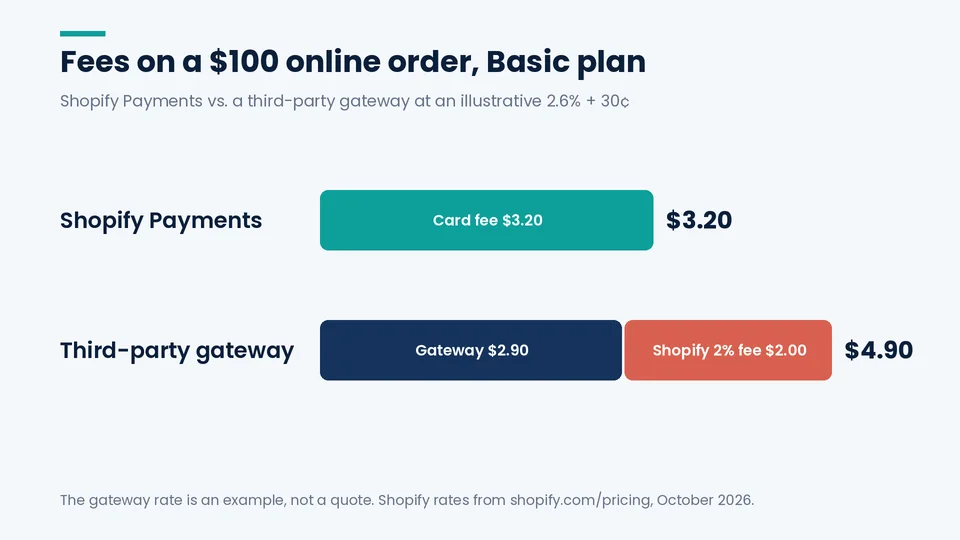
The catch is a second fee. When an order is processed through a third-party gateway, Shopify charges a third-party transaction fee on top of whatever the gateway charges you:
| Plan | Third-party transaction fee |
|---|---|
| Basic | 2% |
| Grow | 1% |
| Advanced | 0.6% |
| Shopify Plus | 0.2% |
Shopify’s rules on when that fee applies, as of October 2026:
- It applies to every order processed through a third-party or alternative gateway, even if Shopify Payments is also turned on.
- If Shopify Payments is your primary provider, PayPal orders are exempt.
- Manual payment methods, such as cash on delivery and bank transfers, are exempt.
- On stores created on or after May 12, 2025, Shopify charges the fee on the part of an order paid with gift cards or store credit, even when the rest goes through Shopify Payments.
A worked monthly example
Take a store on Basic doing $20,000 a month in online card sales across 400 orders, an average of $50 each. With Shopify Payments at 2.9% + 30垄, processing costs $580 plus $120 in per-order fees, or $700 a month.
Now run the same orders through an outside gateway that charges an illustrative 2.6% + 30垄. The gateway takes $520 plus $120, or $640. Shopify then adds its 2% third-party fee, another $400. The total is $1,040, or $340 a month more than Shopify Payments, even though the gateway’s own rate looked cheaper.
Move the same store to Advanced and the picture tightens: Shopify Payments at 2.5% + 30垄 costs $620, while the outside gateway plus Shopify’s 0.6% fee comes to $760. The gap narrows as you move up plans, and on Plus at 0.2% a gateway with genuinely lower rates can come out ahead. The 2.6% rate is an assumption for illustration, not a quote from any provider.
When a third-party gateway still makes sense
Shopify Payments is the cheaper, simpler default for most US stores, but not for all of them. An outside provider is worth considering when:
- Shopify Payments isn’t offered where you’re based. As of October 2026, Shopify’s supported countries list covers 40 countries and regions, including the US, Canada, the UK, Australia, Japan, and much of the EU.
- Your business category isn’t supported. Shopify’s US payments terms list prohibited and restricted business types, and some categories need extra review. If you’re declined, you’ll need a provider that accepts your category.
- You’re on Plus with a negotiated processing contract. At a 0.2% fee, an existing enterprise processor with lower rates can make sense, especially if your finance team already reconciles against it.
- You need a payment method Shopify Payments doesn’t offer. Shopify lets you run a direct third-party provider alongside Shopify Payments to add methods, but the third-party fee still applies to those orders.
If you’re weighing a move to Shopify from WooCommerce or Magento, note that you can’t bring your old gateway’s pricing along without that fee. Factor it into the business case in our WooCommerce to Shopify migration checklist or our Magento to Shopify migration checklist. If payment costs are part of a wider platform decision, our WooCommerce vs Shopify comparison puts both platforms’ fees side by side.
Eligibility and what Shopify asks for
Before activating, Shopify says to confirm that your business type is eligible and that you have the documents your country requires. In the US, expect to provide:
- Personal identification for the account owner
- Business information and, where applicable, registration details
- A US bank account for payouts
- Proof of address, if Shopify asks for it during verification
Shopify can request more verification later, and its terms let it adjust security requirements at its discretion. Finish verification before launch rather than after your first orders arrive. Shopify’s US help pages also cover Form 1099-K tax reporting for Shopify Payments; talk to your accountant about how it applies to your business.
When Shopify Payments payouts arrive
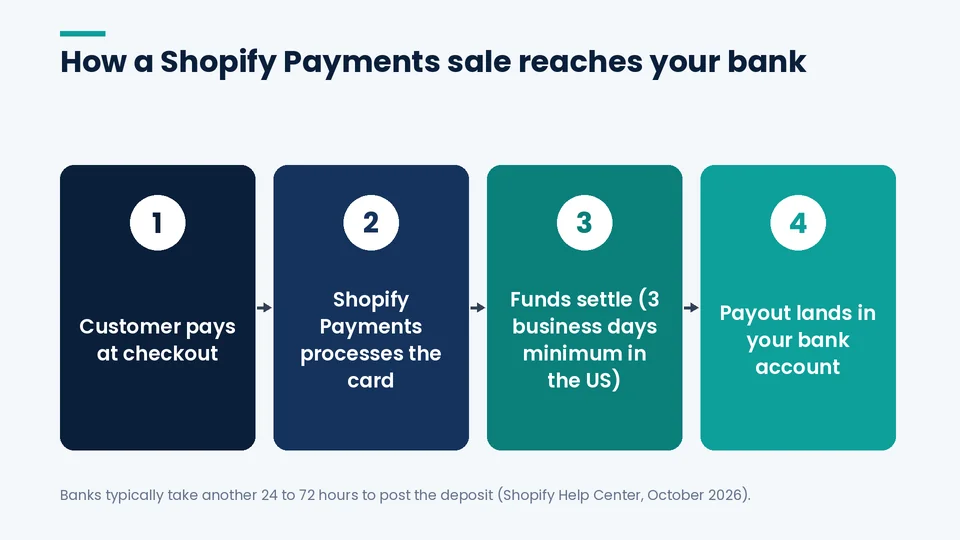
Shopify’s US payouts page says payouts “typically arrive in your bank account within 3 to 5 business days after a customer’s payment is captured.” The details behind that range:
- Settlement. The US minimum settlement time is 3 business days. New accounts start with longer settlement times that shorten as you reliably fulfill orders on time.
- Weekend batching. Payments captured Friday through Sunday are combined into a single payout.
- Bank processing. Banks typically take another 24 to 72 hours to post the deposit.
- No minimum. There’s no minimum payout amount in the US.
US payouts default to USD. You can add bank accounts in AUD, CAD, EUR, or GBP, but a Multi-Currency Payout fee applies to those. Shopify notes that using Shopify Balance as your payout account can speed up settlement.
Chargebacks, reserves, and holds
A chargeback happens when a cardholder disputes a charge with their bank. Shopify’s chargebacks guide explains that the bank takes the disputed amount from you right away, plus a chargeback fee, and with Shopify Payments that amount comes out of your next available payout. If you win the dispute, you get the money back, and Shopify might refund the fee depending on your country or region.
Shopify also states that it “isn’t liable for chargebacks” and isn’t involved in deciding outcomes, so the evidence you submit matters. Keep tracking numbers, delivery confirmations, and customer messages tied to each order.
The US payments terms also describe a reserve account, which Shopify can draw on for amounts you owe, such as refunds or chargebacks. Plan cash flow with that possibility in mind, and keep your dispute rate low with clear product pages, fast shipping updates, and a return policy customers can find.
A payment setup checklist before launch
On the store launches PROSeCommerce handles, we run payments through the same short list every time:
- Turn on two-step authentication for the store owner account.
- Activate Shopify Payments from Settings > Payments and finish identity and bank verification.
- Confirm which card brands, wallets, and local methods are active, and remove any you don’t want.
- Place test orders in test mode, including a refund, and check how fees appear.
- Decide whether PayPal stays on; with Shopify Payments as the primary provider, it carries no third-party fee.
- Review fraud analysis settings and decide who checks high-risk orders.
- Save the payout schedule and settlement details where your bookkeeper can find them.
Payments also feed into your plan choice: the card rate drops on every tier, which is why our comparison of Shopify Advanced vs. Shopify Plus treats processing costs as part of the plan decision.
Frequently asked questions about Shopify payments
Does Shopify take a percentage of each sale?
Can I use PayPal with Shopify Payments?
How long do Shopify Payments payouts take?
Can I use Shopify Payments and another gateway at the same time?
What happens if Shopify Payments isn’t available in my country?
Do I get card fees back when I refund an order?
Choosing your payment setup
For most US Shopify stores, the right answer is Shopify Payments as the primary processor, PayPal turned on beside it, and a third-party gateway only where there’s a clear reason. Recheck the math whenever you change plans, because the third-party fee and card rates both shift with each tier.
If you want help setting up payments, reviewing your processing costs, or planning a platform move, PROSeCommerce’s Shopify development team can walk through it with you.