

What “is Shopify right for your business” really asks
Shopify is a hosted ecommerce platform: Shopify runs the storefront, checkout, payments infrastructure, and hosting, and you pay a monthly plan plus card fees and apps. Asking whether it is right for your business is really asking whether that trade-off fits your product mix, team, and growth plan better than owning the stack yourself.
Shopify is a strong fit when you want a reliable store online quickly, prefer not to manage servers, and can work within Shopify’s themes, apps, and checkout rules. It is a weaker fit when you need deep custom checkout logic on a standard plan, sell mostly one-off digital files, or already have a team that lives in Magento or heavily customized WooCommerce. At PROSeCommerce, part of PROS Global, a San Diego Shopify and Magento agency, we start every platform conversation with how you sell today, not with a brand preference.
This guide is a decision framework for US merchants in 2026. It links to our deeper posts on Shopify’s disadvantages, WooCommerce vs. Shopify, and Shopify plans instead of repeating them. Prices below are US list prices from Shopify’s pricing page as of October 2026.
Business models that usually fit Shopify well
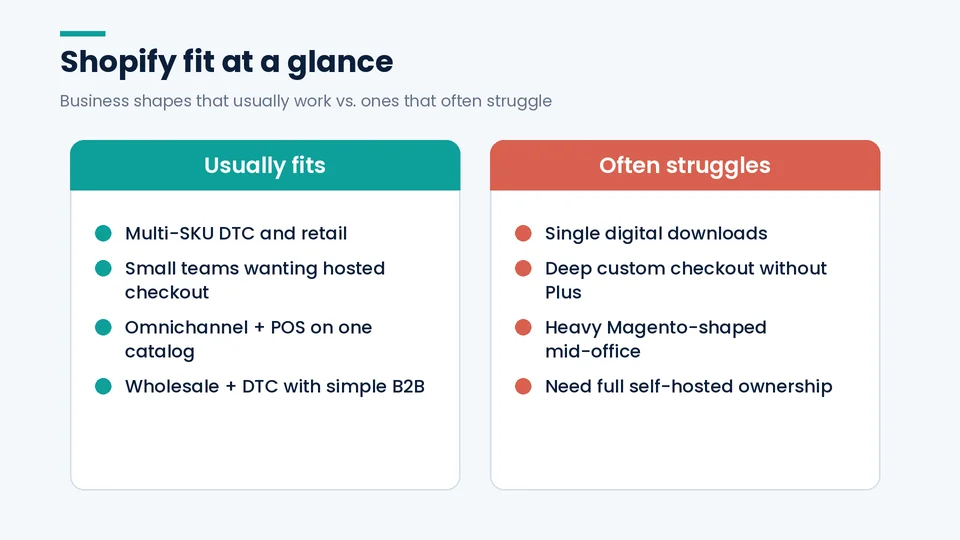
Shopify works best for catalog-driven retail: physical products, DTC brands, multi-SKU stores, and teams that want one admin for online, social, and in-person sales. If those conditions match how you sell, Shopify is usually worth a serious trial.
Typical strong fits:
- Branded DTC and retail catalogs. Unlimited products on every paid plan, themes, and a high-converting hosted checkout.
- Small teams that need speed. Basic, Grow, and Advanced include hosting, SSL, and abandoned checkout recovery without a DevOps hire.
- Omnichannel sellers. POS, Shop, social channels, and marketplaces can sit on one product catalog.
- Wholesale plus DTC on one stack. Standard plans include up to three B2B catalogs; Plus includes unlimited catalogs per Shopify’s pricing comparison table as of October 2026.
- Migrations off aging hosted or poorly maintained open-source stores. When the store is the bottleneck, Shopify’s managed platform removes a large class of ops work. A careful WooCommerce-to-Shopify migration plan covers redirects and data mapping when you do move.
Dropshipping, print-on-demand, and simple subscription catalogs can also work well when the apps and suppliers you need are mature. The decision then hinges less on “can Shopify do it” and more on margin after apps and card fees.
Business models where Shopify often loses
Shopify is not automatically wrong for complex businesses, but some models pay a tax for choosing it. If most of your list below is true, pause and compare Magento (Adobe Commerce), WooCommerce, or a custom build before you commit.
Common misfits:
- Single digital downloads or light digital catalogs. A PayPal button, Gumroad-style tool, or a WordPress plugin can be cheaper and simpler than a full Shopify plan.
- Heavy custom checkout on a standard plan. Full checkout customization is a Plus feature on Shopify’s pricing table as of October 2026. On Basic through Advanced, checkout changes are limited.
- Deep ERP/PIM workflows that assume Magento’s data model. Migrations are doable, but you will redesign processes, not just move products. See our Magento to Shopify migration checklist.
- Stores that need absolute code ownership and self-hosting. WooCommerce and Magento keep the application on infrastructure you control.
- Marketplaces-first businesses. If Amazon or Etsy is the store and you only need a simple brand site, Shopify may be overkill until branded DTC becomes the growth path.
Shopify’s own Agentic plan (no monthly subscription for selling through AI channels, with no published online store) is a reminder that not every Shopify product is a classic storefront. For a traditional online store, you still need a paid plan.
Cost reality check for 2026
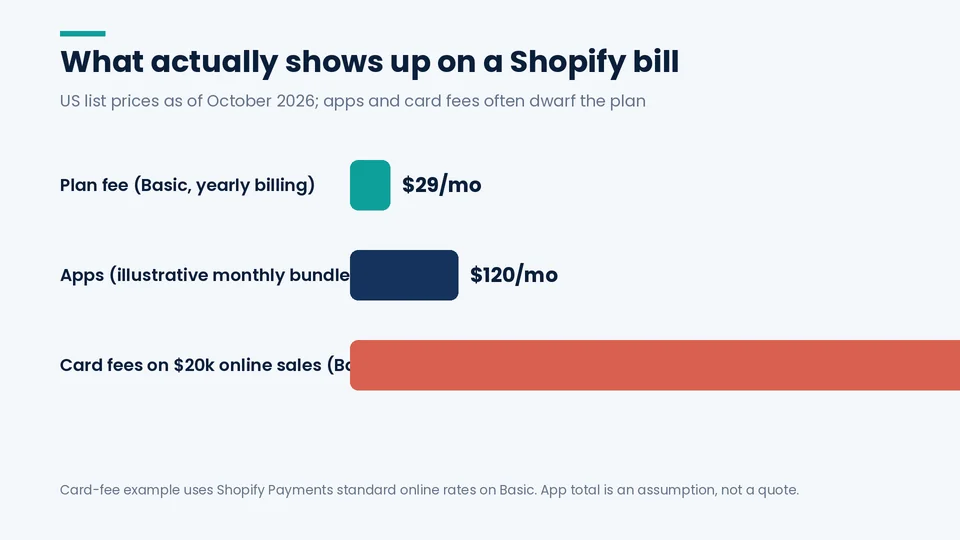
Shopify’s subscription is rarely the largest line item. Card processing, apps, and themes usually dwarf Basic or Grow once sales start. Budget the whole stack, not just the plan fee.
As of October 2026 on US yearly billing from shopify.com/pricing:
| Plan | Yearly billing | Monthly billing | Online card rate (Shopify Payments) | Third-party gateway fee | Staff accounts |
|---|---|---|---|---|---|
| Basic | $29/month | $39/month | 2.9% + 30¢ | 2% | Owner only |
| Grow | $79/month | $105/month | 2.7% + 30¢ | 1% | 5 |
| Advanced | $299/month | $399/month | 2.5% + 30¢ | 0.6% | 15 |
| Plus | From $2,300/month (3-year) | $2,500/month (1-year) | 2.25% + 30¢ | 0.2% | Unlimited |
Also budget POS Pro at $89 per location per month if you sell in stores, paid apps on their own cycles, and premium themes as one-time purchases. Our Shopify merchant account guide explains how Shopify Payments and third-party gateways change the fee math.
If you are comparing platforms on total cost of ownership, include hosting, security, developer time, and downtime risk on Magento or WooCommerce, not only license fees. That is where Shopify often wins for mid-market brands even when the sticker looks higher than “free” software.
When Magento, WooCommerce, or custom still win
Open-source and custom stacks win when control and unique commerce logic are the product. Shopify wins when time-to-market and managed reliability matter more than owning every layer.
Pick WooCommerce when you already run WordPress well, your catalog is modest, and a developer on your team can maintain plugins and hosting. Pick Magento / Adobe Commerce when complex B2B rules, multi-site catalogs, or enterprise mid-office integrations are already built around Magento’s model and switching would cost more than staying. Pick custom when checkout, pricing, or marketplace logic is so unique that no SaaS plan will fit without endless app glue.
For a side-by-side of ownership versus convenience, use our WooCommerce vs. Shopify comparison. For enterprise platform choice, weigh Shopify Plus against Magento on total cost of ownership, not only license fees.
A practical fit checklist
Use this checklist before you buy a theme or hire a migration partner. Score each item honestly with your ops lead, not only marketing.
- Product shape. Multi-SKU physical or hybrid catalog? Lean Shopify. One digital file? Look elsewhere first.
- Team access. Need staff logins next quarter? Basic is out; start at Grow.
- Checkout needs. Need deep checkout edits on day one? Plan for Plus or accept theme/app limits on standard plans.
- Payments. Can you use Shopify Payments in your country and category? If not, model the extra third-party fee.
- Integrations. List ERP, 3PL, PIM, and subscription tools. Confirm each has a maintained Shopify path.
- SEO and content. Can you accept Shopify’s URL and theme constraints and still execute SEO? Our Shopify SEO checklist shows what to verify.
- Migration debt. How many redirects, gift cards, and customer passwords must survive? Factor that into timeline.
- Growth path. Will you need expansion stores, headless Hydrogen, or unlimited B2B catalogs in 12–24 months? That points toward Plus later, not necessarily day one.
If five or more items point to Shopify, run a paid trial with real products and a real payment method. If three or more point away, get a Magento or WooCommerce quote before you rewrite your stack.
How PROSeCommerce scopes the decision
When merchants ask us whether Shopify is right, we do not answer from a sales script. We map order volume, staff roles, checkout exceptions, and the systems that cannot move. That scoping conversation is where most “Shopify vs everything” debates get settled in a single afternoon.
We then recommend Basic, Grow, Advanced, or Plus using current list prices, or we say stay put. Fake urgency (“everyone is migrating”) does not help. Neither does pretending Magento or WooCommerce has no place in 2026. The right answer is the one your team can operate for the next two years without constant platform drama.
Shopify strengths that matter in day-to-day ops
Beyond plan prices, Shopify’s practical strengths show up in daily work. Checkout, payments, and theme updates sit on Shopify’s infrastructure, so your team spends less time on patches and more time on merchandising. App and theme markets cover most common needs, from subscriptions to reviews, without a custom build for every feature.
Performance and SEO still need attention. Themes and apps can bloat scripts, and rankings depend on disciplined on-page work rather than the platform alone. Use a current Shopify SEO checklist when you evaluate fit for organic growth.
International selling through Shopify Markets is available on standard plans, which helps US brands testing new countries without standing up a second platform. Duties, local payment methods, and domains still need configuration. Markets is a reason many growing brands stay on Shopify rather than splitting stacks by region.
Red flags in “Shopify is perfect” advice
Be wary of articles that promise Shopify will fix a weak product, weak margins, or a missing go-to-market plan. The platform cannot invent demand. Also treat “unlimited everything” claims carefully: storage and bandwidth are effectively unconstrained for normal stores on paid plans, but API rate limits, staff seats, B2B catalogs, and checkout customization still differ by plan as of October 2026.
Another red flag is ignoring migration cost. Moving from Magento or a heavily customized WooCommerce store is a project with redirects, data mapping, and parallel testing. If someone quotes only a theme install price for a complex migration, get a second estimate.
Frequently asked questions about choosing Shopify
Is Shopify good for a small business in 2026?
Is Shopify worth it compared with WooCommerce?
When should I not use Shopify?
Does Shopify work for wholesale and B2B?
How long does a typical Shopify launch take?
Can I switch away from Shopify later?
Make the call with eyes open
Shopify is right for your business when hosted commerce matches how you sell and when total cost, including fees and apps, still leaves a healthy margin. It is the wrong default when you need ownership of every layer or when your catalog is too simple to justify a full store platform.
If you want a second set of eyes on fit, plan choice, or a migration scope, talk with PROSeCommerce through our Shopify development services page. Bring your product list, current platform pain points, and the three integrations you cannot lose. That is enough to decide whether Shopify belongs in your stack.