

The bottom line for WooCommerce store owners
Migrating from WooCommerce to Shopify makes sense in 2026 if your team spends more time keeping the store running than growing it: plugin conflicts, hosting and PHP upgrades, security patches, checkout fixes. If WooCommerce runs smoothly, you have a dependable developer, and you depend on deep WordPress customization or a large content operation, staying put is often the better call. Either way, don’t cut over during your peak season.
At PROSeCommerce, a San Diego Shopify and Magento agency that’s part of PROS Global, we get asked this a lot, and the honest answer is “it depends.” Below is what it depends on.
Key terms
- WooCommerce: A free, open-source ecommerce plugin for WordPress. The software costs nothing, but you pay for hosting, premium plugins, a theme, and the developer time to keep it all compatible.
- Shopify: A hosted, subscription-based commerce platform. Hosting, checkout, security, and core updates are included in the plan fee.
- Total cost of ownership (TCO): Everything a platform costs to run over time: fees, hosting, apps or plugins, payment processing, and the people who maintain it.
- Replatforming: Moving a store from one ecommerce platform to another, including data, design, integrations, and SEO.
What changed for WooCommerce stores in 2026
Three things raise the question this year.
1. The hosting baseline moved up. WooCommerce now recommends WordPress 6.9 or higher, PHP 8.3 or higher, MySQL 8.0 or higher (or MariaDB 10.6+), HTTPS, and a 256 MB memory limit (WooCommerce server requirements). WooCommerce still runs on older stacks, but its docs say those versions have reached end of life and may expose your site to security vulnerabilities.
2. A PHP deadline is close. PHP 8.2 stops receiving security fixes on December 31, 2026. PHP 8.3 follows on December 31, 2027 (PHP.net). If your store is on 8.2 or earlier, you’ll be paying for an upgrade project soon, and every plugin has to come along with it. That’s the natural moment to ask whether you’d rather spend that budget on a migration.
3. Shopify’s import path got easier. Shopify now has a first-party Store Migration app that supports WooCommerce, alongside CSV imports and third-party migration apps (Shopify Help Center). It doesn’t move everything (order history and reviews still need other tools), but the starting point is better than it was a few years ago.
The real cost comparison
The real cost of Shopify versus WooCommerce is total monthly spend, not the license fee. WooCommerce is free, but you pay for hosting, premium plugins, and developer upkeep. As of October 2026, Shopify plans run $29 to $299 a month billed yearly, with Plus from $2,300 (Shopify pricing), plus apps and card processing.
The most common mistake in this decision is comparing Shopify’s plan fee to WooCommerce’s $0 license. A fair comparison looks at the whole picture:
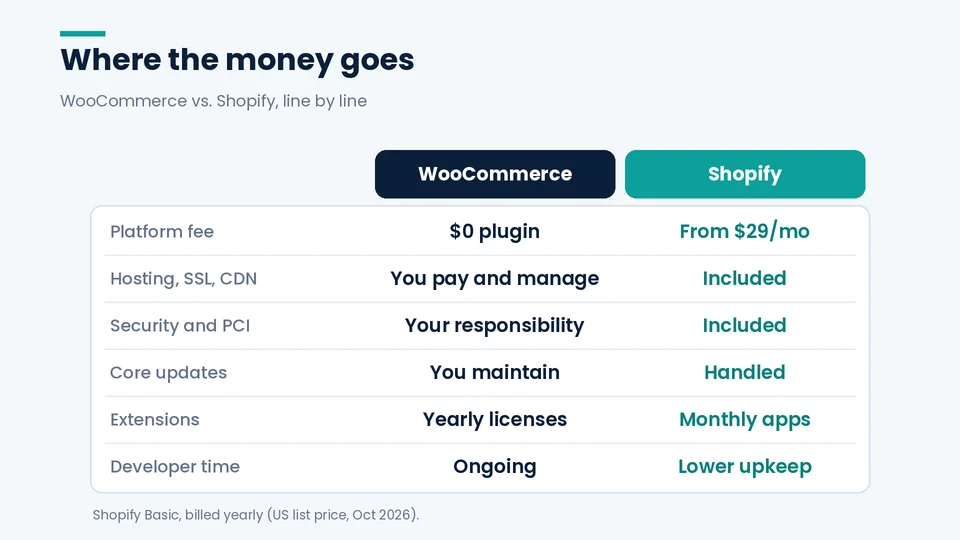
| Cost line | WooCommerce | Shopify |
|---|---|---|
| Platform fee | $0 for the plugin | Basic $29/mo, Grow $79/mo, Advanced $299/mo billed yearly. Monthly billing is $39, $105, and $399. Plus starts at $2,300/mo (Shopify pricing) |
| Hosting, SSL, CDN | You buy and manage it | Included |
| Security and PCI | Your server, your responsibility | Shopify says it is certified Level 1 PCI DSS compliant and stores are PCI compliant by default (Shopify pricing FAQ) |
| Core updates | WordPress, WooCommerce, PHP, and plugins, all kept compatible by you | Handled by Shopify |
| Extensions | Premium plugins, often yearly licenses | Apps, usually monthly subscriptions |
| Card processing | Depends on your gateway | Shopify Payments online card rates from 2.9% + $0.30 (Basic), 2.7% + $0.30 (Grow), 2.5% + $0.30 (Advanced), 2.25% + $0.30 (Plus) (Shopify pricing) |
| Using another payment gateway | No platform penalty | Shopify lists a 2% third-party transaction fee on Basic if you don’t use Shopify Payments (Shopify pricing) |
| Developer time | Ongoing: updates, conflicts, performance | Lower for routine upkeep. Still needed for theme and app work |
Two things this table doesn’t show. First, on WooCommerce, developer time is usually the biggest line, and it’s easy to miss because it shows up as invoices and late nights rather than a subscription. Second, on Shopify, app subscriptions add up. A store that installs an app for every small gap can end up with a bill that rivals its old maintenance retainer.
WooCommerce makes the counter-argument plainly: it has no platform fees or revenue share, and it says Shopify Plus moves to a 0.25% revenue-based fee above $800,000 in monthly sales, capped at $40,000 a month (WooCommerce). Shopify doesn’t publish that percentage or cap itself. As of October 2026, its Plus pricing page lists $2,300 a month on a three-year term or $2,500 on a one-year term and says more complex, higher-volume businesses switch to a variable platform fee based on revenue and business model. For very high-volume stores with strong in-house engineering, that argument carries weight.
For a feature-by-feature view, see our WooCommerce vs. Shopify comparison, and for plan selection, which Shopify plan fits your business.
Five signs you’re ready to move
- Plugin updates feel risky. If your team holds off on updates because something broke last time, you’re carrying security risk and losing time.
- Nobody owns the stack. The original developer is gone, and every fix starts with someone figuring out how the site was built.
- Checkout problems keep coming back. Payment plugin conflicts, broken coupons, and tax quirks after updates all show up as lost orders.
- Traffic spikes make you nervous. If a promotion or a press mention means calling your host, the infrastructure is setting the limits on your marketing.
- You want to sell in more places with less glue code. Shopify bundles point of sale, multiple sales channels, and international selling in its plans (Shopify pricing), which many WooCommerce stores currently handle through stacked plugins.
If three or more of these apply, the business case is usually there.
When staying on WooCommerce is the better call
Staying on WooCommerce is usually the better call when the store runs smoothly, a reliable developer keeps it current, and the business depends on WordPress content or custom features that Shopify could only match with apps or a rebuild. In that situation, a migration costs real money and adds risk without solving a problem you actually have.
A good consultant should talk you out of a migration that doesn’t make sense. Stay put, at least for now, if:
- Content is your growth engine. You run a large WordPress blog or editorial site where commerce is secondary, and your team lives in the WordPress editor.
- Your custom logic is the product. Complex configurators, unusual pricing, or deep custom PHP that would be expensive or impossible to rebuild within Shopify’s extension model. WooCommerce itself notes that on Shopify you can customize in select places but can’t change how the underlying system behaves (WooCommerce).
- Things work and someone owns them. Managed hosting, a reliable developer, current PHP, and no recurring incidents. “Shopify is easier” isn’t enough reason to take on migration risk.
- You have heavy subscription revenue and little runway. Moving active subscribers between billing systems takes careful planning. Don’t do it under deadline pressure. Shopify’s Admin API can import saved payment methods held at Stripe, Authorize.Net, or Braintree (Shopify.dev); anything stored elsewhere needs a plan with your subscription app.
Timing: when to migrate, and when to wait
The best time to migrate from WooCommerce to Shopify is your slowest sales period, with enough room before your next peak to test everything and fix redirects. For most US retailers planning in the fall, that means using the fourth quarter for discovery and building, then cutting over early in the new year once holiday returns settle.
Shopify’s own SEO team lists “migrating right before the busy season” as a common pitfall and expects organic traffic to recover within a few weeks for small sites and over months for large ones (Shopify blog). Google likewise recommends moving during a period of lower traffic (Google Search Central).
What that means for most US retailers this year:
- Planning now (October 2026)? Use Q4 for discovery, the URL and data audit, and building on a development store. Aim to cut over in January or February 2027, after holiday returns settle.
- Already mid-build? Only launch before Black Friday/Cyber Monday if you can finish with time to spare for testing and a few quiet weeks afterward. Otherwise, wait. Discounts, gift cards, and peak traffic are the worst conditions to debug a new checkout in.
- Seasonal outside Q4? (Pool supplies, back-to-school, wedding.) Work back from your slowest month, not the calendar.
- On PHP 8.2? Weigh a short, low-risk PHP upgrade to stay secure through peak season against a rushed migration. The upgrade is usually the safer bridge.
What you give up, and how to plan around it
| Trade-off | Why it matters | How to plan for it |
|---|---|---|
| URL structure changes (/product/ to /products/, /product-category/ to /collections/) | Rankings depend on the redirects | A full 301 map loaded before launch. As of October 2026, Shopify allows 100,000 redirects on standard plans (Shopify Help Center) |
| Three product options per product | Complex variable products may need restructuring | Split products, use metafields, or add an options app (Shopify Help Center) |
| Customer passwords don’t transfer | Returning customers need to activate their accounts | A clear activation email at launch |
| Reviews and order history need apps | Native importers don’t cover them | Budget for a migration app and a reviews app |
| Less low-level control | Some custom behavior can’t be replicated | Audit custom code before committing |
The step-by-step process (CSV mapping, import order, redirect patterns, launch checklist) is in our WooCommerce to Shopify migration checklist.
A quick decision checklist
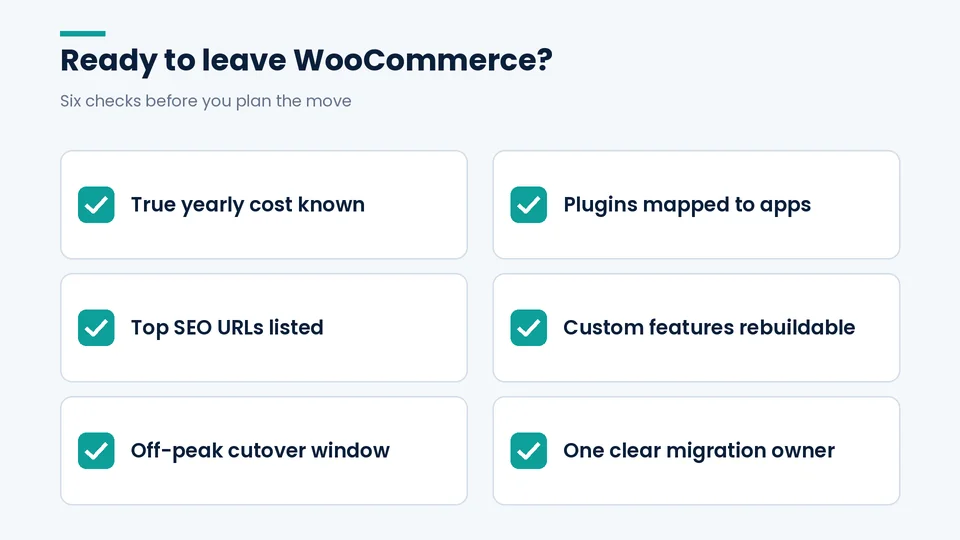
When the PROSeCommerce team runs discovery with a WooCommerce store owner, we work through these same six questions before anyone talks about themes, apps, or timelines.
- I know what WooCommerce costs me per year, including developer and agency time, not just hosting.
- I’ve listed every plugin and know which ones Shopify covers natively, which need an app, and which I can drop.
- I know which URLs drive organic revenue (Search Console + analytics).
- My custom features are either rebuildable on Shopify or not essential.
- I have a cutover window outside my peak season.
- Someone owns the migration end to end, internally or with a partner.
If you can check all six, you’re ready to plan. If you can’t check the first two, start there. They usually settle the decision.
FAQ
Is Shopify cheaper than WooCommerce?
Sometimes. WooCommerce has no license fee, but hosting, premium plugins, and developer time add up. Shopify’s plan includes hosting and core security but adds app subscriptions and, if you don’t use Shopify Payments, a third-party transaction fee. Compare your actual 12-month WooCommerce spend, including developer invoices, against a realistic Shopify plan plus the apps you’d need.
Will switching to Shopify improve my conversion rate?
Not automatically. Checkout, speed, and UX can improve on a well-built Shopify store, but results depend on your theme, apps, and offer. Treat any promised lift as a hypothesis and measure it against your pre-migration baseline. Mobile UX is usually the first place to look, and our notes on improving the mobile experience on a Shopify store are a practical starting point.
Is it a bad idea to migrate before the holidays?
For most US retailers, yes, unless you finish with plenty of time to spare. Shopify’s SEO team lists migrating right before the busy season as a common pitfall. A January or February cutover is usually safer.
Can I keep my WordPress blog if I move my store to Shopify?
Yes, but it’s a decision with SEO consequences. You can migrate posts into Shopify’s blog with redirects, or keep WordPress on a subdomain or separate setup. Moving posts keeps everything on one domain and platform, while keeping WordPress preserves the editorial workflow. Choose deliberately rather than by default.
How do I know if my store is too complex for Shopify?
Audit custom code and plugins first. Products with more than three options, bespoke pricing engines, and deep custom checkout logic are the usual sticking points. Many have Shopify answers (metafields, apps, Functions on Plus), but some don’t, and it’s better to find out in discovery than in development.
Conclusion
Moving from WooCommerce to Shopify is a good decision when it buys back time and lowers risk, and a costly one when it’s done for novelty or rushed into peak season. Add up your real costs, be honest about what you’d give up, and pick a quiet window to launch.
If it would help to talk it through, PROSeCommerce works with stores on both sides of this decision, including Shopify migrations when they make sense. We’re glad to look at your setup and give you a straight answer, even if that answer is “not yet.”